
Every team generates data. The question is whether that data is governed, trusted, and queryable — or siloed, duplicated, and owned by no one. Data management tools are the software layer that determines which. This guide covers 20 of them across six functional categories: integration, warehousing, governance, quality, metadata management, and MDM. For each tool you will find what it does, what it is genuinely good at, what it is not ideal for, and what it costs — including the number, not just "contact sales." If you are building a data warehouse specifically, see the data warehouse build guide and data warehouse automation overview for the full context around the tools in Categories 1 and 2.
Disclosure: amridata builds five data warehouse design tools in Category 2 of this guide. Those tools appear in the warehousing section. For every other tool in Categories 1, 3, 4, 5, and 6, we have no commercial stake. Tool selection in those categories is based on capability, pricing, and market positioning — not commercial relationships.
What Are Data Management Tools?
Data management tools are software applications that help organisations collect, store, govern, and analyse data across its lifecycle. The term covers a wide spectrum — from a startup using PostgreSQL and dbt to an enterprise running Informatica MDM, Snowflake, and Collibra. What they have in common is a focus on the data infrastructure layer: moving data, storing it, documenting it, validating it, and controlling who can use it.
The key distinction is that data management sits beneath data analysis. Management covers the infrastructure — moving, storing, governing, and quality-checking data. Analysis is what you do once that infrastructure is in place. Bad data management produces unreliable analysis. Good data management makes analysis trustworthy at any scale. For more on what analysis looks like once the management layer is in place, see our data analysis overview.
Because data management spans six distinct disciplines, it rarely maps to a single tool. Most teams need a stack. This guide maps that stack by category so you can identify where your problem sits before evaluating specific products.
The 6 Categories of Data Management Tools
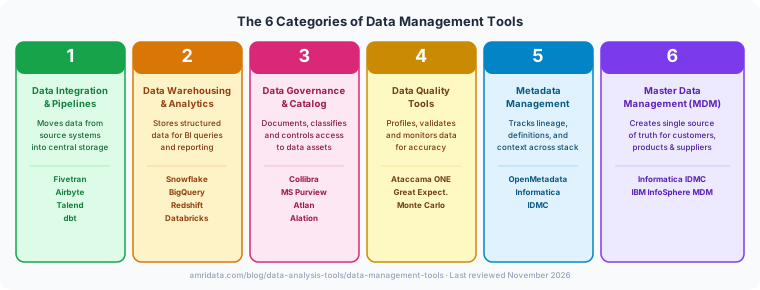
| Category | What It Solves | Where It Sits | Key Tools in This Guide |
|---|---|---|---|
| 1. Integration & Pipelines | Moving data from sources into central storage | Source → Warehouse | Fivetran, Airbyte, Talend, dbt |
| 2. Warehousing & Analytics | Storing structured data for BI queries | Central storage layer | Snowflake, BigQuery, Redshift, Databricks, amridata |
| 3. Governance & Catalog | Documenting, classifying, and controlling data assets | Across the warehouse layer | Collibra, Microsoft Purview, Atlan, Alation |
| 4. Data Quality | Profiling, validating, and monitoring data accuracy | Pipeline and warehouse | Ataccama ONE, Great Expectations, Monte Carlo |
| 5. Metadata Management | Tracking lineage, definitions, and cross-system context | Across the full stack | OpenMetadata, Informatica IDMC |
| 6. Master Data Management | Single source of truth for customers, products, suppliers | Across source systems | Informatica IDMC, IBM InfoSphere MDM |
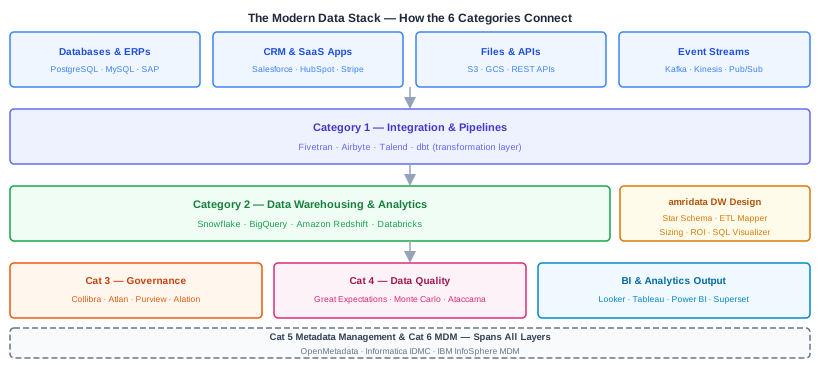
Start with the category where your data problem is most painful. Teams that try to implement all six categories simultaneously typically end up with an expensive procurement cycle, a long implementation, and tools that never reach full adoption. Solve integration first if data doesn't reach your warehouse reliably. Solve quality first if dashboards regularly show numbers nobody trusts. Add governance once you have enough data assets in place to be worth governing.
Quick Comparison: 20 Data Management Tools
| Tool | Category | Best For | Not Ideal For | Open Source | Free Tier | Starting Price |
|---|---|---|---|---|---|---|
| Fivetran | Integration | Fully managed ELT with 700+ SaaS connectors | Tight budgets — MAR pricing scales steeply | No | No | ~$500/mo |
| Airbyte | Integration | Open-source ELT with engineering control | Teams without self-hosting capacity | Yes | Yes (self-hosted) | Cloud from $10/mo |
| Talend Data Fabric | Integration + Quality | Hybrid ETL with built-in quality checks | Teams wanting simplicity — steep learning curve | No | No | Custom |
| dbt | Transformation | SQL-first transformation with version control | Data extraction — dbt transforms, doesn't extract | Yes (Core) | Yes (Core) | Cloud from $100/mo |
| Snowflake | Warehousing | Cloud-native analytics, multi-cloud | On-premise requirements | No | 30-day trial | ~$2–$4/credit |
| Google BigQuery | Warehousing | Serverless analytics in Google Cloud | Non-Google Cloud environments | No | 1 TB/mo free | $5/TB processed |
| Amazon Redshift | Warehousing | AWS-native columnar warehousing | Teams outside the AWS ecosystem | No | 2-month trial | $0.25/hr |
| Databricks | Lakehouse | ML/AI workloads on structured and unstructured data | Teams wanting SQL analytics only | Partial | Community edition | Consumption-based |
| amridata DW tools | DW Design | Star schema design, ETL planning, DW sizing | ETL execution or BI reporting | No | All 5 tools free | Free |
| Collibra | Governance | Enterprise policy management and stewardship | Teams without a dedicated governance programme | No | No | ~$100k+/yr |
| Microsoft Purview | Governance | Azure-native cataloging and M365 classification | Non-Microsoft environments | No | Limited | ~$0.50/scan hr |
| Atlan | Governance | Collaborative data catalog with modern UX | Enterprises needing deep custom workflows | No | No | Custom |
| Alation | Governance | Natural language AI for data discovery | Teams with undocumented data assets | No | No | Custom |
| Ataccama ONE | Data Quality | Enterprise AI + rule-based quality profiling | SMBs — complexity and pricing suit large teams | No | No | Custom |
| Great Expectations | Data Quality | Pipeline-embedded, code-first quality checks | Teams wanting a UI — GX is code-first | Yes | Yes (self-hosted) | Cloud on request |
| Monte Carlo | Observability | ML-based anomaly detection and incident alerting | Rule-based quality enforcement | No | No | Custom |
| OpenMetadata | Metadata | Open-source lineage, discovery, and governance | Teams needing enterprise SLAs without self-hosting | Yes | Yes (self-hosted) | Cloud on request |
| Informatica IDMC | Metadata + MDM | Enterprise metadata automation and multi-domain MDM | SMBs — pricing starts at ~$31k/mo | No | No | Custom (~$31k+/mo) |
| Informatica IDMC (MDM) | MDM | Multi-domain MDM across customers, products, suppliers | Single source system or small teams | No | No | Custom |
| IBM InfoSphere MDM | MDM | Regulated industries needing hybrid MDM | Cloud-first organisations | No | No | ~$31,000/mo managed |
Prices are as of November 2026. Cloud consumption pricing varies significantly by usage volume — model your expected usage before comparing plans rather than relying on headline rates.
Category 1: Data Integration and Pipeline Tools
Integration tools solve the first problem every data team faces: getting data from dozens of source systems — CRMs, ERPs, databases, marketing platforms, payment processors — into a central repository where it can be queried together. The modern approach is ELT (extract, load, transform), where data lands raw in the warehouse before transformation. These four tools differ primarily on managed versus open-source deployment, connector breadth, and pricing model.
Fivetran
Fivetran is a fully managed ELT platform with over 700 pre-built connectors covering SaaS apps, databases, event streams, and files. It handles change data capture (CDC) automatically and updates schemas when source systems change — without engineering intervention. The core proposition is that data delivery should require zero maintenance once a connector is configured.
Best for: Teams wanting fully managed, reliable ELT with broad SaaS connectivity and no engineering overhead on the pipeline layer. Particularly strong for teams with many different data sources — finance, CRM, marketing, support — and limited data engineering capacity.
Not ideal for: Teams with tight budgets. Fivetran's MAR (monthly active rows) pricing scales steeply with data volume, and costs can surprise teams whose sources generate high row counts. Teams needing highly custom transformations post-ingestion are better served adding dbt alongside Fivetran. Teams with on-premise-only requirements are excluded.
Pricing: Starter plans from approximately $500/month for typical small-team data volumes; enterprise pricing custom. No free tier. Free trial available.
Airbyte
Airbyte is the leading open-source ELT platform, with over 550 connectors maintained by both the Airbyte team and a large open-source community. It supports CDC, can be self-hosted on any infrastructure, and includes a low-code connector builder for custom sources. Airbyte Cloud removes the ops overhead for teams that want managed delivery without Fivetran's pricing model.
Best for: Engineering teams wanting control over connector logic and no vendor lock-in on the integration layer. Teams whose sources include niche APIs or internal systems that Fivetran doesn't cover. Teams wanting genuinely free data integration at any volume by self-hosting.
Not ideal for: Teams without engineering capacity to self-host, maintain, and monitor an Airbyte instance. Teams needing strong SLA guarantees on data freshness — Fivetran and Estuary are better for latency-sensitive pipelines. Community connectors vary in quality and maintenance frequency.
Pricing: Self-hosted Community is free. Airbyte Cloud starts from $10/month (consumption-based); Scale plan from $149/month. Enterprise self-hosted: custom.
Talend Data Fabric (by Qlik)
Talend Data Fabric — now part of Qlik following a 2023 acquisition — combines ETL/ELT data integration with built-in data quality checks, API management, and a metadata catalog in one platform. It is designed for teams that want integration and quality handled by the same vendor rather than stitched together from point solutions.
Best for: Teams running hybrid ETL (on-premise and cloud) that want validation checks applied to data during pipeline execution rather than after it lands in the warehouse. Regulated industries where the audit trail of data transformations matters.
Not ideal for: Teams wanting simplicity — Talend's depth comes with a steep implementation curve and Java-heavy internals that slow onboarding. Teams wanting open-source flexibility lose most of the advantage here. Post-Qlik acquisition, the product roadmap and pricing have become less predictable for existing customers.
Pricing: Custom (enterprise pricing only). No public starter pricing since the Qlik acquisition.
dbt (Data Build Tool)
dbt is the SQL-first transformation layer of the modern data stack. It runs inside the data warehouse (Snowflake, BigQuery, Redshift, Databricks), turning raw ingested tables into clean, tested, documented models. Every dbt model is a SQL file checked into version control — dbt compiles them into warehouse DDL, runs tests, and generates documentation and lineage automatically.
Best for: SQL engineers who want version-controlled transformation logic with automated testing and documentation. dbt Core is the most widely adopted transformation tool in modern data stacks, with a large community and package ecosystem. dbt Cloud adds scheduling, a visual IDE, and CI/CD integration.
Not ideal for: Teams needing data extraction — dbt handles transformation only, and must be paired with Fivetran or Airbyte for the ingestion layer. Non-engineering teams or analytics teams used to no-code environments will face a steep adoption curve. The SQL Schema Visualizer can be used alongside dbt to visualise and audit the schemas its models produce.
Pricing: dbt Core is open-source (free). dbt Cloud Team plan starts at $100/month; Enterprise plan is custom.
Category 2: Data Warehousing and Analytics Platforms
Data warehousing platforms are where integrated data lives for analytical queries. The modern cloud data warehouse separates storage from compute, allowing teams to scale each independently. The key decision in this category is cloud ecosystem: Snowflake is multi-cloud and ecosystem-agnostic, BigQuery is Google's native platform, Redshift is the AWS choice, and Databricks adds lakehouse architecture for ML/AI-heavy teams. The design decisions — schema model, table structure, ETL architecture — should be made before selecting a platform.
Snowflake
Snowflake is a cloud-native data warehouse built on the idea of separating storage and compute: you scale them independently, pay only for what you use, and can pause compute entirely when queries are not running. It runs on AWS, Azure, and GCP, making it the most cloud-agnostic option in this category and the default choice for multi-cloud data teams.
Best for: Teams wanting cloud-native analytics with no infrastructure management, the ability to run on multiple cloud providers, and clean separation of storage and compute costs. Zero-copy cloning makes dev/test environments fast and cheap. Snowpark brings Python and Java directly into the warehouse for ML workloads.
Not ideal for: Teams with strict on-premise requirements — Snowflake is cloud-only. Cost management is non-trivial: credit consumption can spike unexpectedly with poorly optimised queries or runaway warehouses. Not designed for sub-second real-time serving. Use the DW Sizing Calculator to estimate credit consumption before committing to a tier.
Pricing: Approximately $2–$4 per credit depending on tier and cloud region; storage at approximately $23/TB/month on-demand. 30-day free trial.
Google BigQuery
BigQuery is Google's serverless analytics warehouse. There is no infrastructure to provision or manage — Google handles scaling, storage, and execution. Its pay-per-query pricing model makes it cost-efficient for irregular, ad-hoc workloads compared to reserved-compute alternatives, and 1 TB of queries per month is permanently free.
Best for: Teams already in Google Cloud — the native integrations with Pub/Sub, Dataflow, Vertex AI, and Looker are hard to replicate otherwise. Serverless model eliminates warehouse sizing and cluster management. Pay-per-query on-demand pricing is efficient for ad-hoc exploratory workloads.
Not ideal for: Teams not in the Google Cloud ecosystem. Pricing models (on-demand versus slot reservations) are complex and can confuse teams without a GCP architect. Query costs can escalate with poorly written full-table scans against large datasets.
Pricing: On-demand: $5/TB processed, storage $0.02/GB/month. Flat-rate reservations from $2,000/month. 1 TB/month of queries free permanently.
Amazon Redshift
Amazon Redshift is AWS's columnar data warehouse. RA3 node types separate storage from compute (similar to Snowflake), and Redshift Spectrum allows querying data directly in S3 without loading it into Redshift first. For teams already running significant AWS infrastructure, Redshift is the path of least resistance — IAM, Glue, Lake Formation, and SageMaker all connect natively.
Best for: Teams with existing AWS infrastructure who want tight integration with S3, Glue, Lake Formation, and SageMaker. Redshift Spectrum extends the warehouse to query S3 data lakes without a full load. Strong for SQL-heavy, predictable batch workloads.
Not ideal for: Teams outside the AWS ecosystem — the operational advantage disappears without AWS-native tooling around it. Cluster administration is more hands-on than Snowflake or BigQuery: vacuum, analyse, and workload management require active tuning. Not the right choice for teams wanting to minimise DBA overhead.
Pricing: dc2.large from $0.25/hr; RA3 nodes from $1.086/hr; Redshift Serverless from $0.36/RPU-hr. 2-month free trial for new accounts.
Databricks
Databricks introduced the lakehouse architecture — a platform that handles both structured SQL analytics and unstructured data for ML/AI on a single open Delta Lake foundation. Where Snowflake and BigQuery are optimised for BI-focused SQL workloads, Databricks targets teams running data science and ML engineering alongside analytics. Photon engine delivers fast SQL execution when needed.
Best for: Teams running ML and data science workloads alongside SQL analytics who want a single platform. Delta Lake is an open format with no proprietary lock-in on the data layer. MLflow and Feature Store provide mature ML workflow management. Community Edition is free for learning and experimentation.
Not ideal for: Teams wanting simple SQL analytics only — Databricks is more complex and expensive than Snowflake or BigQuery if you are only running SQL. Consumption-based DBU pricing is difficult to forecast without historical usage data. Steeper learning curve than pure-SQL warehouses. Use the DW ROI Calculator to compare platform economics before committing.
Pricing: Consumption-based DBU pricing; rates vary by workload type and cloud. Community Edition free for learning. Enterprise plans custom.
amridata: Data Warehouse Design Tools
Disclosure: amridata builds the five tools below. We have included them here because they address the design phase that precedes every other warehousing tool on this list. The tools are free, platform-agnostic, and generate schemas and architecture diagrams that target Snowflake, BigQuery, Redshift, or any other warehouse.
Most teams skip the design phase and go straight to provisioning a warehouse and configuring a pipeline. The result is an over-provisioned cluster, schemas that do not serve BI queries, and ETL logic that has to be re-architected six months later. The five amridata tools address each design decision before any vendor contract is signed.
- Star Schema Designer — Design dimensional models visually: drag-and-drop fact and dimension tables, define relationships, and export DDL for any target warehouse. Use this during schema design, before creating warehouse tables.
- ETL Pipeline Mapper — Map your data flow from source systems to staging to warehouse to data mart. Generates a pipeline architecture diagram and identifies transformation requirements before any code is written.
- SQL Schema Visualizer — Upload existing DDL or paste table definitions to get an interactive ER diagram. Use this for teams inheriting an existing schema who need to understand its structure before modifying it.
- DW Sizing Calculator — Estimate data volume, compression ratios, and infrastructure requirements. Use before sizing a Snowflake, Redshift, or BigQuery deployment.
- DW ROI Calculator — Model the business case for a data warehouse investment: team time saved, speed-to-insight value, and infrastructure cost amortisation. Use when presenting a DW proposal to leadership.
Pricing: All five tools are free.
Category 3: Data Governance and Catalog Tools
Governance tools solve the trust problem: who owns a data asset, what does it mean, who can access it, and how does it comply with GDPR or CCPA? As data management software stacks scale, undocumented datasets proliferate and "what does this column actually mean?" becomes a time-sink. Catalog tools create a searchable, documented, governed layer over the warehouse. The difference between Collibra (heavy policy workflows) and Atlan (developer-friendly discovery) defines the enterprise versus modern split in this category.
Collibra
Collibra is the enterprise data governance standard — a platform built around policy management, stewardship workflows, data dictionaries, lineage, and compliance reporting. It uses BPMN 2.0 workflow automation for data stewardship approval processes. Large financial services, healthcare, and insurance organisations rely on Collibra to manage regulatory data obligations across complex, multi-system environments.
Best for: Enterprises with a dedicated data governance programme, regulatory compliance obligations (GDPR, CCPA, BCBS 239), and the resources to implement and maintain a formal stewardship process. Mature audit trail and lineage capabilities. Extensive integrations with Snowflake, BigQuery, Redshift, Databricks.
Not ideal for: Teams without a dedicated data governance programme — Collibra requires significant setup, ongoing stewardship resources, and executive sponsorship. SMBs and fast-moving startups will find the approval-workflow model too heavy. Implementation typically takes 3–6 months to show value.
Pricing: Custom. Enterprise deployments typically start at $100,000+ per year. No self-serve pricing.
Microsoft Purview
Microsoft Purview (formerly Azure Purview) combines a data catalog, sensitivity labeling, information protection, and AI governance in a single Microsoft-native platform. It scans data across Azure, Microsoft 365, and third-party sources, automatically classifying sensitive data types (PII, financial, health) and building a lineage graph. For organisations running most of their estate on Microsoft infrastructure, it eliminates the need for a separate governance vendor.
Best for: Teams with significant Azure and Microsoft 365 infrastructure — SharePoint, OneDrive, Exchange, Azure SQL, Synapse, ADLS all connect natively with minimal configuration. Sensitivity labeling integrates with Microsoft Information Protection. Consumption-based pricing avoids large upfront commitments.
Not ideal for: Multi-cloud or non-Microsoft environments — Purview's catalogue breadth and deep integrations are designed for the Microsoft ecosystem first. Teams running primarily AWS or GCP infrastructure will find Atlan or OpenMetadata more practical. The governance workflow layer is lighter than Collibra.
Pricing: Consumption-based. Data Map capacity units from $175/unit/month; scan compute approximately $0.50/hour. Free tier available for limited capacity.
Atlan
Atlan is the modern data catalog — built for how data teams actually work rather than how compliance teams want them to. It integrates with Slack, dbt, Airflow, and GitHub natively, pushing data context to where engineers and analysts already operate. Discovery is search-first, documentation is collaborative, and the UX is consumer-grade compared to legacy governance tools.
Best for: Fast-moving data teams at high-growth companies who want catalog adoption without a formal governance programme. Cross-stack lineage across the full pipeline. Developer-friendly integrations — dbt, Airflow, Spark, GitHub, Slack. Significantly lower adoption friction than Collibra.
Not ideal for: Very large enterprises needing deep custom governance workflows with BPMN-level approval chains and compliance audit trails — Collibra is better suited there. Atlan is catalog-first with lighter policy enforcement capabilities. Teams in heavily regulated industries (banking, healthcare) may outgrow its governance layer.
Pricing: Custom. Contact sales for a quote. Free trial available.
Alation
Alation is a search-first data catalog with a natural language AI layer for querying and discovering data assets. It is built on the idea that most data consumers are not SQL engineers — they need to find, understand, and trust data without writing a query. Alation's AI analyses query history to surface the most-used and most-trusted tables and columns.
Best for: Teams wanting to enable self-service analytics beyond the data engineering team. Natural language querying removes the SQL barrier for business users. Query history analysis identifies which tables are actively trusted and used — surfacing the signal from the noise of an undocumented catalog.
Not ideal for: Teams that have not yet documented their data — Alation's AI quality depends on metadata quality and query history richness. Without documented assets and active usage patterns, the natural language layer has little to draw from. Teams needing full governance workflows with approval chains are better served by Collibra.
Pricing: Custom. Enterprise pricing with no public tiers.
Category 4: Data Quality Tools
Data quality tools address the most common root cause of unreliable dashboards: the data itself is wrong. The category splits into two philosophies — reactive quality (validate data against rules as it flows through pipelines) and proactive observability (ML-based anomaly detection that flags problems before anyone notices). Great Expectations is code-first and reactive; Monte Carlo is ML-first and observability-focused; Ataccama ONE sits across both for enterprise teams.
Ataccama ONE
Ataccama ONE is an enterprise data quality platform that combines AI-powered profiling with rule-based validation, cleansing, and monitoring. It covers the full quality lifecycle: profile data to understand what you have, define rules to validate what it should be, cleanse to fix what is wrong, and monitor to catch regressions. Its MDM capabilities also put it in Category 6 territory for enterprises wanting a single quality-and-MDM vendor.
Best for: Large enterprises in regulated industries that need AI-powered profiling to identify quality issues without manually defining every rule, plus a governance audit trail. Single platform for profiling, cleansing, monitoring, and MDM reduces vendor count. Strong in financial services and insurance.
Not ideal for: SMBs and startups — pricing and implementation complexity are calibrated for large enterprises. Teams wanting open-source or self-serve tooling will find Great Expectations or Monte Carlo far more accessible. Requires dedicated implementation resources to deliver value at speed.
Pricing: Custom (enterprise pricing only). Contact sales for a quote.
Great Expectations
Great Expectations (GX) is the leading open-source data quality framework. Engineers define "expectations" — assertions about what data should look like — as code, then embed those checks into Airflow, dbt, or Prefect pipelines. When data violates an expectation, the pipeline fails or alerts fire. Data Docs generates human-readable quality reports for stakeholders.
Best for: Engineering teams with a Python culture who want automated, testable, version-controlled quality checks without a SaaS subscription. Expectations as code mean quality checks live in version control alongside pipeline code. Integrates natively with dbt, Airflow, Spark, Databricks, and all major warehouses. Massive community with hundreds of built-in expectation types.
Not ideal for: Teams without a Python engineering culture — GX is fundamentally code-first. Data analysts who want a UI-driven quality tool will struggle with onboarding. The initial setup (connecting data sources, configuring the Data Context) has a learning curve that some teams underestimate.
Pricing: Open-source self-hosted: free. Great Expectations Cloud pricing on request. No public SaaS pricing tier as of November 2026.
Monte Carlo
Monte Carlo pioneered data observability — the ML-driven approach to data quality. Rather than writing explicit quality rules, Monte Carlo learns the normal behaviour of your data (volumes, freshness, schema, distributions) and alerts when something deviates from baseline. It maps data lineage automatically and traces anomalies upstream to their root cause. The core use case: your BI dashboard shows a suspicious number and you need to know why, fast.
Best for: Teams whose "dashboard shows bad data" problem is chronic. ML-based anomaly detection requires no rule authoring — it learns your data's normal patterns automatically. End-to-end lineage maps incidents to their upstream source within minutes. Automated incident tracking with Slack alerting. No code required: connects to warehouses via API and starts monitoring immediately.
Not ideal for: Teams that need rule-based quality enforcement — Monte Carlo detects anomalies but does not enforce schema constraints or validate values against business rules the way Great Expectations does. Smaller teams with limited data volumes may not generate enough signal for the ML models to learn meaningful baselines quickly.
Pricing: Custom. Enterprise pricing based on data volume and connector count. No self-serve tier.
Category 5: Metadata Management
Metadata management goes deeper than the catalog layer. Where governance tools focus on policy and access, metadata platforms track lineage (where did this data come from and where does it go?), data dictionaries (what does this field mean?), and cross-system context (this customer_id in the CRM is the same entity as the user_id in the warehouse). It is the connective tissue of a mature data management platform, operating across all six categories rather than at a single stage.
OpenMetadata
OpenMetadata is an open-source metadata platform that covers lineage, discovery, documentation, and governance in a single tool. It integrates natively with dbt, Airflow, Slack, Superset, and all major warehouses. Its REST API makes it programmable — teams extend and automate metadata workflows without proprietary SDK constraints. For teams that want Collibra or Atlan-level metadata capabilities without enterprise pricing, OpenMetadata is the most capable open-source alternative.
Best for: Engineering teams wanting open-source (Apache 2.0) metadata management with full source code and no vendor lock-in. Comprehensive integrations: 60+ connectors including dbt, Airflow, Spark, and Databricks. REST API-first means programmatic access to all metadata operations. Active community with regular releases.
Not ideal for: Teams needing enterprise SLAs, dedicated support, and professional services without self-hosting capability. OpenMetadata's managed cloud is newer than the self-hosted product — teams with strict uptime requirements may prefer Atlan's maturity. The ops overhead of a self-hosted deployment is real for teams without infrastructure engineers.
Pricing: Self-hosted: free. Managed cloud: free tier available; paid tiers by request.
Informatica IDMC
Informatica Intelligent Data Management Cloud (IDMC) is Informatica's cloud platform spanning metadata management, MDM, data quality, and integration in a single vendor. It is the choice for large enterprises wanting to consolidate their entire data management stack under one contract and one support relationship. IDMC's metadata automation uses AI to scan, classify, and catalogue data assets across hybrid and cloud environments.
Best for: Large enterprises that want single-vendor coverage across metadata, MDM, quality, and integration — reducing vendor complexity under one contract. AI-powered metadata automation classifies data at scale without manual tagging. Mature product with decades of enterprise data management experience. Strong in regulated industries with compliance and lineage reporting. Hybrid deployment across on-premise and cloud.
Not ideal for: SMBs and mid-market teams — pricing starts at approximately $31,000/month for managed tiers, which makes best-of-breed alternatives (Atlan for catalog, Great Expectations for quality) far more economical unless you need every capability on one contract.
Pricing: Custom. Managed tier pricing starts around $31,000/month based on published Informatica pricing references. Enterprise negotiated contracts vary significantly.
Category 6: Master Data Management (MDM)
MDM solves the entity identity problem: the same customer appears in your CRM as "ACME Corp", in your ERP as "ACME Corporation Ltd", and in your support system as "Acme". MDM tools create a single golden record by matching, merging, and governing key entities — customers, products, suppliers, locations — across source systems. It is a relatively narrow category but a critical one for enterprises where data duplication directly causes compliance failures, duplicate outreach, or revenue reporting errors.
Informatica IDMC (MDM)
Informatica IDMC's MDM module handles multi-domain master data — customers, products, suppliers, and locations simultaneously on a single platform. Its AI-powered matching engine identifies duplicate entities across source systems with configurable confidence thresholds. Stewardship workflows handle exception management when automated merging is not confident enough.
Best for: Enterprises with complex, multi-system entity duplication problems across customer, product, supplier, and location domains simultaneously. AI-powered entity matching reduces manual deduplication effort. Cloud-native with API-first architecture for integration into existing systems. Mature product with strong regulated industry references.
Not ideal for: Organisations with a single source system or small data teams — MDM's complexity and pricing are calibrated for enterprises with significant cross-system entity duplication. Teams that only need ETL or BI capabilities will pay for far more than they need.
Pricing: Custom. MDM is typically bundled as part of the broader IDMC platform contract.
IBM InfoSphere MDM
IBM InfoSphere MDM is the choice for heavily regulated industries — financial services, healthcare, insurance — where data residency requirements, audit trails, and on-premise deployment options are non-negotiable. It supports hybrid deployment: organisations can keep sensitive master data on-premise while extending governance to cloud systems. IBM's decades in regulated data environments make InfoSphere MDM the reference implementation in banking and healthcare MDM programmes.
Best for: Financial services, healthcare, and insurance enterprises with strict data residency requirements, compliance obligations (BCBS 239, AML, KYC, HL7 FHIR, HIPAA), and existing IBM infrastructure. Hybrid on-premise/cloud deployment is a genuine differentiator for organisations that cannot put sensitive master data in a public cloud.
Not ideal for: Cloud-first organisations — InfoSphere MDM's strength is hybrid and on-premise deployment, and cloud-native teams will find Informatica IDMC more aligned. Teams outside the IBM ecosystem face significant integration complexity and cost. Implementation lifecycle is long — expect 6–12 months to full production.
Pricing: Published managed tier starts at approximately $31,000/month. Enterprise licensing varies significantly by deployment model and contract terms.
How to Choose the Right Data Management Tool
Most buying guides give vague advice at this point. Here is a decision framework that actually narrows down your shortlist.
Step 1 — Identify where your data problem actually lives
Before evaluating any tool, map your current data flow. Where does data break? In transit (integration problem → Category 1)? In storage (warehousing problem → Category 2)? In trust (governance problem → Category 3)? In accuracy (quality problem → Category 4)? In consistency across systems (MDM problem → Category 6)? Most teams have problems in multiple categories — start with the most painful one, solve it, then expand. Trying to solve everything at once leads to procurement complexity and failed implementations.
Step 2 — Assess your team's technical maturity
Code-first teams (data engineers, SQL-fluent analysts): dbt + Airbyte + Great Expectations + OpenMetadata. All open-source, CLI/code-driven, and highly composable. Mixed teams (some engineering, some business analysts): Fivetran + Snowflake + Atlan + Ataccama ONE — managed services with strong UIs reduce friction for non-engineers. Business-led teams (minimal engineering capacity): Microsoft Purview + BigQuery + Alation + Collibra — managed, UI-first, with vendor-led implementation support.
Step 3 — Check your existing cloud ecosystem
In AWS? Start with Redshift + AWS Glue; evaluate Atlan or Purview for governance. In Azure / Microsoft 365? Azure Synapse or Fabric for warehousing; Purview is native. In Google Cloud? BigQuery is the natural warehouse; Dataplex for governance. Cloud-agnostic? Snowflake + Airbyte + dbt + OpenMetadata gives the most flexibility and least lock-in. Cloud ecosystem is a constraint, not a preference — the tools that integrate natively with your existing stack will cost less to operate and maintain.
Step 4 — Model total cost of ownership, not just licensing
Licensing is the visible cost. The hidden costs are implementation time (6–12 months for enterprise tools), training, maintenance engineering, and migration costs if the tool underdelivers. "Free" and "open-source" are not zero-cost — Great Expectations and Airbyte require engineering hours to deploy, maintain, and monitor. For open-source tools, model 20–30% of an engineering FTE for ongoing maintenance. For enterprise tools, add 15–25% of license cost for professional services.
Step 5 — Run a proof of concept on your messiest real data
Before committing to any enterprise data management solution, run a POC on your messiest source data — not vendor demo data. If a tool's UI shows clean, schema-consistent records but cannot handle your actual JSON nested arrays, inconsistent date formats, or schema changes, it will not hold up in production. Specific criteria: does it handle schema drift automatically? Does it recover gracefully from source system outages? Does it produce the lineage and documentation your governance team actually needs?
Data Management Tools for Data Warehouse Teams
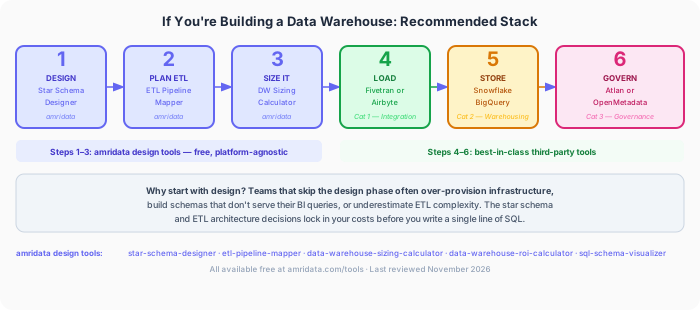
Teams building a data warehouse need tools from at least Categories 1, 2, and 3 before they have a production-ready stack: an integration tool to load source data, a warehouse to store and query it, and a governance tool to document and control it. Most teams add a transformation layer (dbt) and a quality tool on top of that.
What most teams miss is the step before all of this: the design phase. Before configuring a Fivetran connector, choosing a Snowflake tier, or defining a dbt model, the foundational decisions need to be made — which schema model will serve BI queries, how to map ETL logic from source to destination, what infrastructure size the data volume actually requires. These decisions lock in costs and query performance for years. Getting them wrong means rebuilding the warehouse later.
The recommended build sequence:
- Design your star schema — amridata Star Schema Designer
- Plan your ETL architecture — amridata ETL Pipeline Mapper
- Size your warehouse — amridata DW Sizing Calculator
- Build your business case — amridata DW ROI Calculator
- Load your data — Fivetran or Airbyte (Category 1)
- Store it — Snowflake, BigQuery, or Redshift (Category 2)
- Govern it — Atlan or OpenMetadata (Category 3)
For the full step-by-step build process, see the data warehouse build guide. For teams presenting the business case to leadership, the DW ROI Calculator models time saved, speed-to-insight value, and infrastructure cost amortisation in a shareable format.
Frequently Asked Questions
What are data management tools?
Data management tools are software applications that help organisations collect, store, govern, and analyse data across its lifecycle. Because data management spans multiple disciplines — integration, warehousing, governance, quality, metadata, and MDM — it typically requires a stack of specialised tools rather than a single platform. The goal is to make data reliable, accessible, and audit-ready at scale.
What are the main categories of data management tools?
The six main categories are: (1) data integration and pipeline tools, which move data from sources into central storage; (2) data warehousing and analytics platforms, which store structured data for BI queries; (3) data governance and catalog tools, which document, classify, and control data assets; (4) data quality tools, which profile and validate data accuracy; (5) metadata management platforms, which track data lineage and context across the stack; and (6) master data management tools, which create a single source of truth for key business entities like customers, products, and suppliers.
What is the difference between data management and data governance?
Data management is the umbrella discipline — it covers everything from moving data (integration) to storing it (warehousing) to ensuring its quality. Data governance is a subset focused specifically on policies, ownership, classification, and compliance. Governance tools like Collibra and Microsoft Purview are data management tools, but data management includes much more than governance. A team can have a mature data warehouse and strong data quality practice without a formal data governance programme, though at scale, all three eventually become necessary.
Are there free data management tools worth using in production?
Yes. dbt Core (SQL transformation), Airbyte Community (data integration), Great Expectations (data quality), OpenMetadata (metadata management), and PostgreSQL (database) are all open-source tools widely used in production at companies of all sizes. "Free" means no licensing cost — these tools require engineering time to implement and maintain. For teams without that capacity, managed alternatives (dbt Cloud, Airbyte Cloud) offer reduced maintenance at a subscription cost. amridata's five DW design tools are also free and require no engineering setup.
Is Excel a data management tool?
For small datasets and individual analysis, yes — Excel can store, sort, filter, and pivot data effectively. For anything beyond roughly 100,000 rows, collaborative data management, or audit-ready data governance, Excel becomes a liability rather than an asset. Version conflicts, formula errors propagating silently, lack of access controls, and no lineage make Excel a poor substitute for dedicated data management tools at any meaningful scale.
What data management tools are best for a data warehouse project?
Teams building a data warehouse typically need: a data integration tool (Fivetran or Airbyte) to load source data, a warehousing platform (Snowflake, BigQuery, or Redshift) to store and query it, a transformation layer (dbt) to model it, and a governance tool (Atlan or OpenMetadata) to document it. Before selecting any of these tools, design decisions — schema model, ETL architecture, infrastructure sizing — should be made using a data warehouse design tool like the free Star Schema Designer or ETL Pipeline Mapper.
What is the difference between dbt and a data integration tool like Fivetran?
Fivetran extracts data from source systems and loads it into a warehouse (the EL in ELT). dbt transforms data that is already in the warehouse (the T in ELT). They solve different problems and are most commonly used together: Fivetran to bring raw data in, dbt to turn that raw data into clean, tested, documented models. Using dbt without an ingestion tool means you have no data to transform. Using Fivetran without dbt means your raw data lands in the warehouse but is not modelled for BI queries.
What is master data management (MDM) and when do you need it?
MDM tools create a single golden record for key business entities — customers, products, suppliers, locations — that appear inconsistently across multiple source systems. You need MDM when the same entity has different representations in different systems (ACME Corp versus ACME Corporation Ltd versus Acme) and when that duplication directly causes compliance failures, duplicate outreach, or reporting errors. Most teams encounter this problem in customer data first, then product data. If your business runs on a single primary system of record for each entity, MDM is probably premature.
- Teradata. What Is Data Management? Six-category taxonomy of data management disciplines, referenced as the structural foundation for this guide's category framework.
- Fivetran Pricing. Official pricing page — MAR-based model, connector tiers, and starter plan rates as of November 2026.
- Airbyte Pricing. Official pricing page — Community (free), Cloud, and Enterprise tiers as of November 2026.
- Snowflake Pricing Options. Per-credit and storage pricing across cloud providers as of November 2026.
- Google BigQuery Pricing. On-demand, flat-rate, and storage pricing as of November 2026.
- OpenMetadata. Open-source metadata platform — Apache 2.0 licensed, documentation and connector registry.