Data warehouse automation (DWA) is the use of metadata-driven software to automatically generate ETL pipelines, data models, transformation logic, and documentation — replacing the hand-coded SQL and Python scripts that engineers otherwise write and maintain manually. Instead of coding every table, transform, and pipeline from scratch, DWA tools read a central metadata layer and produce the equivalent schema, code, and orchestration automatically.
In a traditional data warehouse project, engineers spend 60–70% of their time on tasks that repeat across every table: writing CREATE TABLE statements, coding ETL transformations, handling slowly changing dimensions, and updating documentation every time a source schema changes. Data warehouse automation tools are built to eliminate that repetition — not by removing engineers from the process, but by removing the busywork, the same way Git eliminated the need to manage code versions by hand.
This guide covers what DWA actually automates (and what it doesn't), how the architecture works, what the engineering difference looks like in real code, and how to assess whether your team is ready for it. If you're evaluating specific platforms, see the companion guide: Best Data Management Tools (2026). For the manual DW build process that DWA replaces, the four-phase data warehouse build guide covers requirements, schema design, ETL, and the query layer with working SQL.
🛠 Already convinced you need DWA? Use the ETL Pipeline Mapper → to design your automated pipeline architecture before selecting a tool.
What Does Data Warehouse Automation Actually Automate?
DWA is a category, not a single tool. It automates specific, well-defined tasks in the data warehouse lifecycle. Getting clear on which tasks fall inside and outside the automation boundary prevents the most expensive DWA mistake: buying a platform expecting it to handle things it was never designed for.
Tasks DWA automates
- Schema design and DDL generation. DWA tools read source metadata — column names, data types, relationships — and auto-generate CREATE TABLE statements for the target warehouse, including fact tables, dimension tables, and staging tables. A schema that takes a data engineer a week to build by hand gets generated in minutes from a metadata definition.
- ETL/ELT code generation. Transformation logic — joins, type casts, filters, aggregations — is generated from the metadata layer rather than hand-coded. The same metadata that defines the schema also drives the transformation scripts.
- Slowly changing dimension (SCD) handling. SCD Type 1 (overwrite) and Type 2 (history preservation with effective dating) logic is generated automatically. SCD Type 2 — the most complex ETL pattern in dimensional modeling — runs to 40–60 lines of SQL per dimension table when written by hand. DWA generates it from a single metadata attribute.
- Data lineage documentation. Every column's journey from source to target is tracked automatically in the metadata layer. This provides audit trails and impact analysis without manual documentation effort.
- Data quality validation. Row count checks, null checks, referential integrity validation, and type checks are auto-generated alongside the pipeline code — not added later when someone remembers to include them.
- Orchestration scheduling. Job dependencies, retry logic, and execution order are generated from the same metadata that drives the schema. Airflow DAGs and dbt project files are outputs, not inputs.
- Version control and change management. Schema changes detected in source systems trigger automated impact analysis and regeneration of affected objects. No manual search-and-replace across 30 transformation scripts when a source column is renamed.
Tasks DWA does NOT automate
This list matters as much as the one above. DWA tools handle the mechanical work — they cannot substitute for engineering judgment.
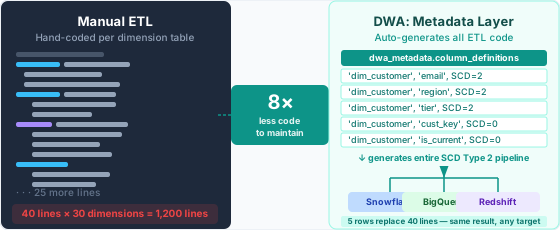
- Business logic decisions. Which metrics to track, how to define a "customer," whether a product return subtracts from revenue or gets recorded separately — these are business decisions, not automation targets.
- Source system analysis and data profiling. Someone has to understand the source data and map business rules to metadata definitions before a DWA tool can generate anything useful. DWA starts where the analysis ends.
- Tool selection and architecture decisions. DWA tools don't evaluate themselves or choose your cloud platform for you.
- Governance policy definition. DWA documents and enforces lineage; humans set the rules — what data is classified as sensitive, who can access it, and how long to retain it.
Manual vs. Automated: What the Code Difference Looks Like
No other article on this topic shows the actual engineering difference between approaches. Here it is. The scenario: a dim_customer dimension table loaded with SCD Type 2 from a CRM source. This is a standard pattern that every data warehouse project with customer data repeats for each dimension it builds.
The manual approach
An engineer writes the full ETL logic by hand. Each engineer writes it slightly differently. Each project re-invents it from scratch.
# Manual ETL: dim_customer SCD Type 2
# Every engineer writes this differently. Every project re-invents it.
# This is one dimension table. Multiply by 30 for a typical warehouse.

import pandas as pd
from sqlalchemy import create_engine, text

engine = create_engine("postgresql://user:pass@host/warehouse")

def load_dim_customer(source_df: pd.DataFrame) -> None:
    """
    SCD Type 2 load for dim_customer.
    Closes expired rows, inserts new current rows.
    Written by hand; must be maintained by hand.
    """
    with engine.begin() as conn:
        # Step 1 — close rows where source attributes changed
        conn.execute(text("""
            UPDATE dim_customer tgt
            SET    is_current   = FALSE,
                   valid_to     = CURRENT_DATE
            FROM   staging_customer src
            WHERE  tgt.customer_key = src.customer_id
              AND  tgt.is_current   = TRUE
              AND  (tgt.email        src.email
                OR  tgt.region       src.region
                OR  tgt.tier         src.tier);
        """))

        # Step 2 — insert new current rows for changed + new customers
        conn.execute(text("""
            INSERT INTO dim_customer
                   (customer_key, email, region, tier,
                    is_current, valid_from, valid_to)
            SELECT src.customer_id,
                   src.email,
                   src.region,
                   src.tier,
                   TRUE,
                   CURRENT_DATE,
                   '9999-12-31'
            FROM   staging_customer src
            LEFT JOIN dim_customer tgt
                   ON tgt.customer_key = src.customer_id
                  AND tgt.is_current   = TRUE
            WHERE  tgt.customer_key IS NULL
               OR  (tgt.email   src.email
                OR  tgt.region  src.region
                OR  tgt.tier    src.tier);
        """))
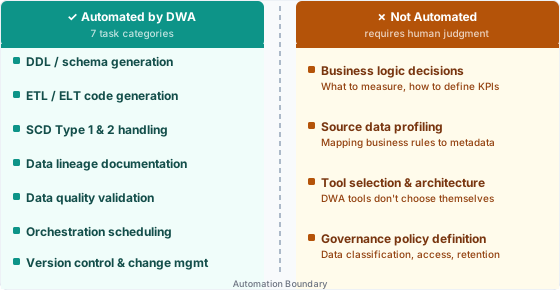
Forty lines for one dimension table. With 30 dimension tables, that's 1,200 lines of SCD logic to write, test, and maintain — before a single fact table loads. When the CRM team renames email to email_address, you hunt through all of it manually. When a new engineer joins, they learn this codebase from scratch rather than from a shared standard.
The automated approach
A DWA tool reads from a metadata layer — a configuration table, a YAML file, or a GUI — and generates the equivalent code automatically. Here's what the metadata definition looks like for the same dim_customer table:
-- DWA metadata table: defines every dimension attribute and its SCD type.
-- The DWA tool reads this and generates the entire ETL script above automatically.

CREATE TABLE dwa_metadata.column_definitions (
    table_name      VARCHAR(100),
    column_name     VARCHAR(100),
    source_column   VARCHAR(100),
    data_type       VARCHAR(50),
    scd_type        SMALLINT,   -- 0 = static, 1 = overwrite, 2 = history
    is_key          BOOLEAN,
    is_nullable     BOOLEAN,
    business_rule   TEXT
);

-- dim_customer configuration: 5 rows replace the 40-line Python script above.
-- The DWA platform generates, tests, and deploys the equivalent logic to any target.
INSERT INTO dwa_metadata.column_definitions VALUES
    ('dim_customer', 'customer_key', 'customer_id', 'INT',     0, TRUE,  FALSE, 'Natural key from CRM'),
    ('dim_customer', 'email',        'email',        'VARCHAR', 2, FALSE, FALSE, 'SCD2: track email changes'),
    ('dim_customer', 'region',       'region',       'VARCHAR', 2, FALSE, TRUE,  'SCD2: track region changes'),
    ('dim_customer', 'tier',         'tier',         'VARCHAR', 2, FALSE, TRUE,  'SCD2: track tier changes'),
    ('dim_customer', 'is_current',   NULL,           'BOOLEAN', 0, FALSE, FALSE, 'DWA-managed audit column');
Five metadata rows replace 40 lines of Python. The DWA platform generates, tests, and deploys the equivalent logic to Snowflake, BigQuery, or Redshift without manual coding. When the CRM renames a column, update one metadata row and regenerate. This ratio — roughly 8× less code to maintain — holds across the entire warehouse at scale.
How Data Warehouse Automation Architecture Works
DWA platforms are structured in layers. Understanding the layer architecture matters when evaluating tools: some platforms cover all six layers natively, others cover only two or three and require you to assemble the rest yourself.
The 6-layer DWA architecture
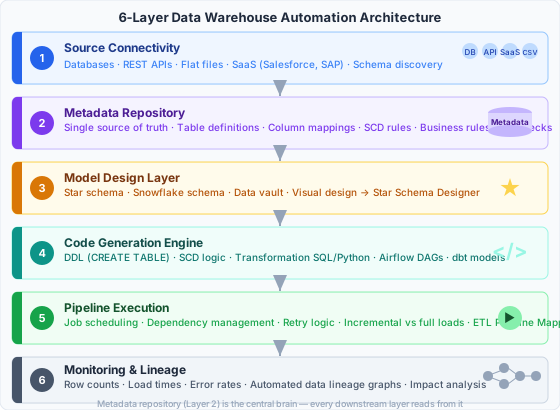
- Source connectivity layer. Connects to source systems — databases, REST APIs, flat files, SaaS tools like Salesforce and SAP. DWA platforms maintain connector libraries that handle authentication and schema discovery. When a source column is added or renamed, this layer detects it and flags it in the metadata layer for review.
- Metadata repository. The central brain. Table definitions, column mappings, SCD rules, business rules, and data quality checks are all stored here. Every generated artefact derives from this single source of truth. This layer is what separates a full DWA platform from a point-solution code generator: metadata changes propagate automatically through every downstream layer.
- Model design layer. Where dimensional models — star schema, snowflake schema, data vault — are defined and validated before any code is generated. The Star Schema Designer is built for this layer: it lets teams design star schema structures visually and export the metadata definitions that DWA platforms consume. Getting the model right here prevents errors from propagating through every downstream step.
- Code generation engine. Reads the metadata repository and generates warehouse-specific DDL (CREATE TABLE), transformation SQL or Python, SCD logic for each dimension, and orchestration manifests — Airflow DAGs, dbt models, or the equivalent in whatever orchestration framework the team uses. The same metadata generates Snowflake SQL for one environment and BigQuery SQL for another.
- Pipeline execution layer. Orchestrates the generated code: job scheduling, dependency management, retry logic, incremental vs. full loads. If you're designing this layer for your automated pipeline, the ETL Pipeline Mapper helps map source → staging → warehouse → mart flow before writing any configuration.
- Monitoring and lineage layer. Captures runtime metrics — row counts, load times, error rates — and generates data lineage graphs. This is where automated data lineage lives: every column transformation recorded in the metadata layer is fully traceable from source to target, without any manual documentation effort.
For a complete walkthrough of the manual build process this architecture replaces, the data warehouse build guide covers all four phases — requirements, schema design, ETL pipeline, and query layer — with working SQL for each step.
Key Benefits of Data Warehouse Automation
The five benefits below are specific and quantifiable. They're also the ones that consistently drive DWA purchase decisions in teams that have done the analysis before choosing a platform.
1. 60–80% reduction in ETL development time
The 8× code reduction shown above isn't specific to SCD logic — it holds across the entire warehouse build. Industry benchmarks put overall ETL development time reduction at 60–80% for teams that have standardised on a DWA platform. A three-month ETL project becomes three to four weeks. A six-month warehouse build ships in six to eight weeks.
The mechanism is straightforward. When every transformation follows the same metadata-driven pattern, the only creative work is defining the metadata. The generation, testing, and deployment of the resulting code is mechanical — and machines execute mechanical work faster than engineers can write it.
2. Consistent data quality at scale
With hand-coded ETL, Engineer A writes SCD Type 2 one way, Engineer B writes it differently. Edge cases — null handling, duplicate detection, timestamp precision — get handled inconsistently across tables. Business teams learn to distrust specific datasets without being able to explain exactly why.
When all transformations follow the same metadata-driven logic, variation is eliminated. One metadata definition applies uniformly across every dimension. Null handling is defined once and enforced everywhere. Quality checks are auto-generated for every pipeline, not bolted on when someone remembers to add them. Pairing the metadata layer with a solid data dictionary locks down definitions at both the technical and business levels.
3. Automated data lineage and governance
Every column transformation recorded in the metadata layer means every column's lineage is fully known. When a GDPR request arrives asking where a customer's email appears across the warehouse, the lineage graph answers in seconds — not after two days of manual audit across 40 transformation scripts.
Impact analysis works the same way. Before renaming a source column, a DWA platform tells you exactly which downstream views, reports, and dashboards will break. Without automated data lineage, that analysis is a manual exercise most teams skip entirely — until something fails in production.
4. Faster time to insight for business teams
Business teams waiting three weeks for a new report is a symptom of slow manual ETL, not a staffing problem. The analyst requests new data. The engineer traces the source, writes staging SQL, writes the transformation, adds the column to the dimension, updates the fact table load, and updates the query layer view. That's five steps, each with its own testing cycle.
With data warehouse automation, adding a new source column to a dimension is a metadata change — update the definition, regenerate, deploy. Hours, not weeks. The analytical methods that become possible once the data is actually available are covered in the data analysis methods guide.
5. Business case: what the ROI looks like
A straightforward calculation for a mid-sized data team:
- 3 data engineers × $120k/yr salary × 70% time on automatable ETL boilerplate = $252k/yr on automatable work
- DWA platform cost: $30k–$80k/yr depending on vendor and scale
- Net savings year 1: $172k–$222k, before counting speed-to-market value or analyst productivity gains
These numbers don't include the downstream cost of ETL bugs reaching production or the opportunity cost of reports that take months instead of weeks to build. The business case strengthens considerably when you add both in.
📊 Building the case for investment? Model your team's specific numbers with the DW ROI Calculator →
Is Your Team Ready for Data Warehouse Automation?
Data warehouse automation pays for itself fastest when specific conditions are present. These five questions identify whether your team is in the right position for it now or whether manual development is still the right path.
The 5-question readiness assessment
-
☐ Does your team write the same ETL patterns repeatedly for different tables?
If your engineers are copy-pasting SCD logic or staging INSERT templates across dimension tables, you're a strong candidate. DWA is most valuable when the same boilerplate pattern appears across dozens of objects — that repetition is precisely what the metadata layer eliminates. -
☐ Do you have more than 10 dimension tables in your current or planned warehouse?
Below 10 dimensions, manual development is tractable. At 10–30 dimensions, the metadata approach becomes dramatically more efficient. Above 30 dimensions, manual ETL maintenance is a full-time job on its own, before any new development work is counted. -
☐ Is data quality inconsistency causing business trust issues?
When stakeholders say they "don't trust the numbers" without being able to pinpoint why, inconsistent transformation logic across manually coded ETL is usually the root cause. Metadata-driven standardisation fixes this systematically across all tables — not table by table. -
☐ Do you spend significant time on data lineage documentation for compliance?
GDPR, CCPA, and SOX all require knowing where data comes from and where it goes. If your team handles lineage documentation manually, automated data lineage is one of the fastest DWA wins — it's a byproduct of the metadata layer, not an extra step. -
☐ Do source system changes regularly break your pipelines?
With hand-coded ETL, a renamed column in Salesforce breaks every transformation that references it. With metadata-driven regeneration, the DWA platform detects the change, flags it, and regenerates affected objects after a human reviews the metadata update.
What your score means
| YES answers | Readiness | Recommended next step |
|---|---|---|
| 0–1 | Early-stage — build manually first | Design your first star schema with the Star Schema Designer; revisit DWA when you have 10+ dimension tables |
| 2–3 | Transition zone — DWA pays off within 12 months | Start comparing platforms; see the Best DWA Tools guide for a side-by-side comparison |
| 4–5 | DWA is not optional — manual development is slowing you down now | Map your automated architecture with the ETL Pipeline Mapper |
Data Warehouse Automation vs. Related Concepts
DWA occupies a specific position in the data toolchain. Teams that conflate it with adjacent categories buy the wrong tool or build the wrong stack. Here's where DWA sits relative to the tools most data engineers already know.
DWA vs. ETL tools
ETL tools — Informatica, Talend, Fivetran, Airbyte — extract and load data. Data warehouse automation tools automate the design and coding of those ETL processes. DWA sits above the ETL layer: it generates the ETL configuration or code that ETL tools then execute. Fivetran extracts your Salesforce records into staging; a DWA platform generates the schema and transformation logic that processes them. The two categories are complementary, not competing.
DWA vs. dbt
dbt is a transformation tool that runs SQL models in a code-first, version-controlled framework — it handles the "T" in ELT. DWA platforms handle schema design, lineage, SCD logic generation, and orchestration in addition to transformation: the full DW lifecycle, not just transformations. Many DWA platforms generate dbt models as their output format. If your team runs dbt already, you're using one component of a DWA stack. The rest of the lifecycle — schema generation, SCD handling, lineage — is still manual.
DWA vs. a data pipeline
A data pipeline is the execution path data takes from source to destination. Data warehouse automation is the system that designs, generates, and manages that pipeline automatically. Pipelines are the output of a DWA platform, not the platform itself. Building pipelines by hand is precisely what DWA replaces.
DWA vs. a data lakehouse
A data lakehouse — Databricks, Delta Lake, Apache Iceberg — is a storage and query architecture. DWA can target a lakehouse the same way it targets a traditional warehouse: it generates the schemas and transformations for whatever target platform the team uses. A team running Delta Lake on S3 and a team on Snowflake both use DWA the same way. The two don't compete.
Frequently Asked Questions
What is data warehouse automation?
Data warehouse automation (DWA) is the use of metadata-driven software to automatically generate ETL pipelines, data models, transformation code, and documentation for a data warehouse. Instead of writing CREATE TABLE statements and ETL logic by hand, engineers define attributes in a metadata layer and the DWA tool generates the equivalent code for any target warehouse platform — Snowflake, BigQuery, Redshift, or on-premises systems.
What does data warehouse automation actually automate?
DWA tools automate schema design and DDL generation, ETL/ELT code generation, slowly changing dimension (SCD) handling, data quality checks, automated data lineage documentation, and orchestration scheduling. Business logic and governance policies still require human judgement — DWA executes what engineers define in the metadata layer, it doesn't decide what to build.
How is data warehouse automation different from ETL tools?
ETL tools execute data pipelines: they extract, transform, and load data. DWA tools sit above the ETL layer and automate the design, coding, and management of those pipelines. DWA generates the ETL code or configuration that ETL tools then run. Fivetran extracts your data; a DWA platform generates the schema and transformation logic that shapes what happens after extraction.
How long does it take to implement data warehouse automation?
Initial DWA implementation typically takes 4–8 weeks for teams that already have a data model defined and a source system inventory in hand. Teams starting from scratch — no defined schema, no source mapping done — should budget 12–16 weeks for the full initial setup including metadata definition. The variable is not the tool setup time but the data modeling work that precedes it. Teams that have already designed their star schema using the Star Schema Designer can cut that timeline significantly.
What are the main benefits of data warehouse automation?
Five benefits consistently appear in DWA evaluations: a 60–80% reduction in ETL development time; consistent data quality through standardised metadata-driven logic; automated data lineage for governance and compliance (GDPR, CCPA, SOX); faster delivery of new reports and analytics to business teams; and significantly lower maintenance cost when source systems change. The ROI calculation above puts first-year net savings at $172k–$222k for a typical three-engineer data team.
Is data warehouse automation the same as AI-generated SQL?
No. AI SQL generators — GitHub Copilot, ChatGPT — suggest code for a human to review and place. DWA tools generate, deploy, and manage the entire data model and pipeline lifecycle from a metadata definition, with no human intervention required for each individual table or transformation. AI is increasingly used inside DWA platforms to automate metadata inference from source schemas, but that's a feature of a DWA tool — not a replacement for one.
Data warehouse automation is not a shortcut. It's a systematic engineering approach that makes DW projects maintainable at scale — one that removes mechanical work so engineers can focus on the decisions that actually require judgment: data modeling, business logic, and architecture design.
If you're ready to evaluate specific platforms, the companion guide Best Data Management Tools (2026) compares WhereScape, TimeXtender, dbt, Matillion, and others side by side across the selection criteria that matter for enterprise and mid-market teams.
If you're still designing your data model, start with the Star Schema Designer — it generates the star schema structure your DWA platform will need to automate. Map the pipeline architecture with the ETL Pipeline Mapper before writing any configuration, and build the business case with the DW ROI Calculator.
- Grand View Research. Data Warehouse Automation Market Report. Market data referenced for $26.5B projected market size and 16% CAGR through 2034.
- Kimball Group. Slowly Changing Dimensions Are Not Always as Easy as 1, 2, 3. kimballgroup.com. Reference for SCD Type 1 and Type 2 implementation patterns referenced in the manual ETL example.
- dbt Labs. What is dbt? docs.getdbt.com. Reference for dbt's role as a transformation layer within the broader DWA toolchain, as distinguished from full DWA platforms.
- WhereScape. Metadata-Driven Data Warehouse Automation: Architecture and Best Practices. wherescape.com. Reference for the metadata repository architecture patterns described in the six-layer architecture section.