There is no single best cloud data warehouse. The right pick depends on which cloud you already run on, how steady your query load is, and whether your team lives in SQL or Python. In practice the shortlist is six platforms: Snowflake, Google BigQuery, Amazon Redshift, Databricks SQL, Azure Synapse Analytics, and ClickHouse Cloud. This guide, part of our Data Analysis Tools series, compares them on pricing, scaling, free tiers, and fit, using list prices checked in November 2026. If you have not designed the warehouse itself yet, start with building a data warehouse and come back here to choose the platform.
Quick answer: the best cloud data warehouse for each use case is:
- Snowflake: best for multi-cloud flexibility and concurrent BI workloads
- Google BigQuery: best for serverless, ad-hoc analytics on Google Cloud
- Amazon Redshift: best for AWS-native teams with steady, large workloads
- Databricks SQL: best for data science and machine learning pipelines
- Azure Synapse Analytics: best for Microsoft and Azure-centric organizations
- ClickHouse Cloud: best for high-concurrency, real-time event analytics
Sizing a warehouse? Estimate storage and compute in the Data Warehouse Sizing Calculator → before you compare quotes.
What Is a Cloud Data Warehouse?
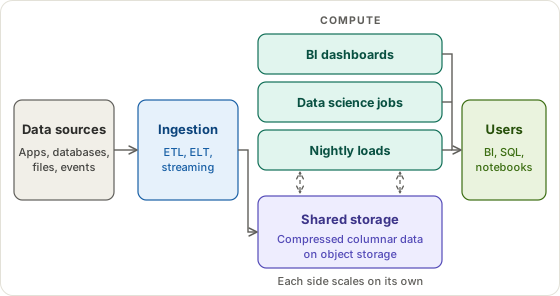
A cloud data warehouse is a managed database built for analytical queries: big scans, aggregations, and joins over many rows at once. The vendor runs the servers, storage, patching, and replication. You load data, write SQL, and pay for what you store and what you compute.
The main difference from an on-premises warehouse is that storage and compute scale separately. You can keep 50 TB of history and run a small cluster against it, or start a large cluster for an hour and shut it down afterward. Older appliances tied the two together, so growth meant buying both.
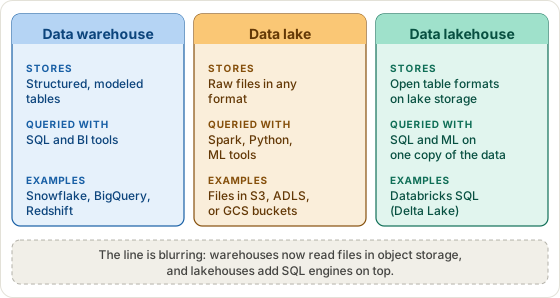
Warehouses also get compared with data lakes and lakehouses. A warehouse holds structured, modeled tables for SQL and BI. A data lake holds raw files in any format and suits data science and machine learning. A lakehouse puts open table formats such as Delta Lake on top of lake storage so one copy of the data serves both. The line is blurring from both sides, and most platforms below can now query files in object storage.
Whatever you choose, you still have to model the data. A first-draft fact and dimension layout takes a few minutes in the Star Schema Designer. The platform decision often lands on the data architect, and our guide to what a data architect does explains who usually owns it.
How We Evaluated These Cloud Data Warehouses
amridata.com has no financial relationship with any vendor in this guide. That matters because many top-ranking comparisons for this topic are written by companies that sell one of the platforms or integrate with several of them. That is not automatically a problem, but you should know who is writing.
We compared each platform on six criteria:
- Pricing model and total cost of ownership
- Performance for BI and analytics workloads
- Scalability, both up and down
- Ecosystem integrations and data ingestion
- Free tier or trial availability
- Operational overhead
Prices are US on-demand list prices from each vendor's pricing page, checked in November 2026. They exclude reserved or committed-use discounts, taxes, and data transfer. Vendors change rates often, so confirm the current number before you budget. When a figure comes from a vendor's own benchmark, we say so.
Cloud Data Warehouse Comparison (Quick Reference)
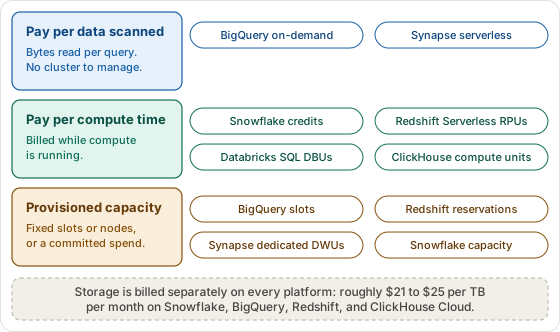
The table lines up the six platforms. The figure after it groups them by how they bill, which affects your invoice more than most feature lists do.
| Platform | Best for | Storage model | Compute billing | Free tier |
|---|---|---|---|---|
| Snowflake | Multi-cloud BI, concurrent workloads | Managed columnar storage on AWS, Azure, or GCP object storage | Credits per second, 60-second minimum | 30 days, $400 credit |
| Google BigQuery | Serverless ad-hoc analytics on Google Cloud | Managed columnar storage (Capacitor) | Per TiB scanned, or per slot-hour | 10 GiB storage and 1 TiB of queries every month |
| Amazon Redshift | AWS-native teams, steady workloads | Redshift Managed Storage (SSD cache backed by S3) | Per RPU-hour (serverless) or per node-hour | $300 credit, 90 days (Serverless) |
| Databricks SQL | ML and data science plus SQL on a lakehouse | Delta Lake tables in your own cloud storage | DBUs per hour, billed per second | Free Edition (non-commercial) plus a trial of the full platform |
| Azure Synapse Analytics | Microsoft and Azure-first organizations | Azure storage (dedicated pools), ADLS Gen2 (serverless) | Per DWU-hour (dedicated) or per TB processed (serverless) | No standing free tier; Azure free-account credit only |
| ClickHouse Cloud | Real-time, high-concurrency analytics | Columnar tables on object storage | Per compute unit-hour, metered per minute | $300 credit, 30 days |
Snowflake: Best for Multi-Cloud BI and Concurrency
Overview
Snowflake runs on AWS, Azure, and Google Cloud, and it keeps storage separate from compute. Compute comes as virtual warehouses: independent clusters that you size, suspend, and resume yourself. Because each team can have its own warehouse, a heavy nightly load does not slow the finance dashboard.
Two Snowflake product names get mixed up. Snowpark is the developer framework for running Python, Java, and Scala inside Snowflake, including UDFs and stored procedures. Cortex is the suite of AI functions and services, such as COMPLETE, SUMMARIZE, and SENTIMENT, plus Cortex Search and Cortex Analyst. One is a way to write code, the other is a set of AI features.
Pricing
Snowflake bills compute in credits, per second, with a 60-second minimum each time a warehouse resumes. Storage is billed separately per TB per month. The edition you choose sets the price per credit.
- Compute: an X-Small warehouse uses 1 credit per hour, and each size up doubles that.
- Price per credit (AWS US East): $2 on Standard, $3 on Enterprise, $4 on Business Critical. Other regions cost more.
- Storage: $23 per TB per month on demand in AWS US regions, measured after compression.
- Trial: 30 days or $400 of credit, whichever runs out first.
Strengths
- The same SQL and features across all three major clouds
- Isolated warehouses, plus multi-cluster warehouses on Enterprise and above
- Time Travel of up to 90 days on Enterprise
- Strong data sharing between accounts and organizations
Limitations
- No local or self-hosted version, so you test against a real account
- A warehouse that never auto-suspends keeps spending credits
- Enterprise costs 50% more per credit than Standard for the same workload
Best for
Teams that need multi-cloud flexibility, many concurrent BI users, and clean sharing of data across business units.
Google BigQuery: Best for Serverless Ad-Hoc Analytics
Overview
BigQuery is Google Cloud's serverless warehouse. There are no clusters to size or pause. Google allocates compute when a query runs, which makes it a natural fit for exploratory work where nobody can predict next month's query volume.
Pricing
BigQuery bills for two separate things: query processing and storage. You can pay for processing per TiB scanned or per slot-hour of reserved capacity.
- On-demand queries: $6.25 per TiB scanned, with the first 1 TiB each month free.
- Active storage: about $0.023 per GiB per month. Data untouched for 90 days drops to long-term storage at about $0.016 per GiB. The first 10 GiB each month is free.
- Capacity pricing: $0.04 per slot-hour on Standard, $0.06 on Enterprise, $0.10 on Enterprise Plus, billed per second with a one-minute minimum.
Note: "You only pay for queries" is a common oversimplification. BigQuery storage charges accumulate independently of query activity, so teams holding large datasets should model both costs. Datasets can also be billed on physical rather than logical bytes, which helps when your data compresses well.
Strengths
- Fully serverless: no warehouse sizing, pausing, or tuning of clusters
- Queries that return an error or hit the cache are not charged
- Native links to Looker, Google Workspace, and Vertex AI
- BigQuery ML for training models with SQL (billed separately)
Limitations
- On-demand bills can spike when queries scan large tables that are not partitioned
- Querying data in other clouds uses BigQuery Omni, which is billed separately
- No self-hosted or local option
Best for
Teams already on Google Cloud, and analysts who want ad-hoc query power without managing infrastructure.
Amazon Redshift: Best for AWS-Native Teams
Overview
Redshift is AWS's columnar, massively parallel warehouse. It comes in two modes: Redshift Serverless, which scales on its own, and provisioned clusters, where you pick node types and counts. If your data already lives in S3 and your identity and security setup lives in AWS, Redshift sits closest to all of it.
Pricing
Redshift offers two billing modes: serverless, metered by the RPU-hour, and provisioned clusters, billed by the node-hour. Storage is a separate line item either way.
- Serverless compute: $0.375 per RPU-hour in US East (N. Virginia), billed per second with a 60-second minimum. The smallest base capacity is 4 RPUs, or $1.50 per hour of active use. Startup time is free.
- Provisioned: RA3 clusters start at $0.543 per hour, and reserved instances lower that for one- or three-year terms.
- Storage: Redshift Managed Storage at $0.024 per GB per month in US East.
- Trial: a $300 credit valid for 90 days for first-time Serverless users.
Strengths
- Deep AWS integration with S3, Glue, Lake Formation, and QuickSight
- Redshift Spectrum queries files in S3 without loading them first
- Concurrency scaling absorbs bursts of dashboard traffic
- Reservations make steady workloads cheap
Note: Redshift does have result caching. When a query repeats and the underlying data has not changed, the cached result comes back without rerunning the query, so no compute is used. AWS introduced the feature in November 2017 and it is on by default. Several online comparisons incorrectly claim otherwise.
Limitations
- Best value inside AWS; multi-cloud use is limited
- Classic resizes of large provisioned clusters can take hours
- Provisioned clusters still reward careful tuning of keys and workload settings
Best for
AWS-native organizations with consistent, predictable workloads that can use reserved pricing.
Databricks SQL: Best for ML and Lakehouse Workloads
Overview
Databricks SQL is the warehouse layer of the Databricks lakehouse, built on Delta Lake. Your data stays in your own cloud storage in an open format, and the same platform runs Spark ETL, notebooks, and machine learning. Of the six platforms, it is the one where analysts and data scientists share the most.
Pricing
Databricks bills in DBUs (Databricks Units) per hour, per second of use. The rate depends on the warehouse type, and only the serverless rate includes the cloud instance cost.
- SQL Serverless: $0.70 per DBU at AWS list price, instance cost included.
- Warehouse size: 2X-Small uses 4 DBUs per hour ($2.80), X-Small 6, Small 12, Medium 24, Large 40.
- SQL Pro and Classic: $0.55 and $0.22 per DBU, with instances billed separately by your cloud provider.
- Storage: Delta Lake files in your own S3, ADLS Gen2, or GCS bucket, billed by the cloud provider.
- Free: Free Edition for non-commercial use, limited to one 2X-Small SQL warehouse. The full platform needs a trial.
Strengths
- One platform for SQL, Spark ETL, and ML, with MLflow and Model Serving built in
- Open Delta Lake format, so your data is not locked in a proprietary store
- Unity Catalog for governance across data and models
- Photon, a vectorized engine, speeds up SQL
Limitations
- A BI-only team gets less from it than from Snowflake or BigQuery
- Governance and workspace setup take real planning
- Costs add up when notebooks, jobs, and SQL warehouses share one account
Best for
Data engineering and ML teams that want processing, model training, and SQL analytics on a single platform.
Microsoft Azure Synapse Analytics: Best for Azure-First Teams
Overview
Azure Synapse Analytics is Microsoft's analytics service. It offers two SQL modes, dedicated pools for steady warehouse workloads and a serverless pool for querying files in the data lake.
Naming note: Azure Synapse Analytics replaced "Azure SQL Data Warehouse" in 2019. Several online guides still use the old name for what is now the dedicated SQL pool.
One more Microsoft product belongs in your evaluation. Microsoft Fabric Data Warehouse is the company's newer warehouse, and Microsoft now publishes a migration kit and assistant for moving dedicated SQL pool workloads to it. Its Synapse documentation also carries a note pointing readers to Fabric. For a brand-new Azure project, compare both before you commit.
Pricing
Synapse bills dedicated pools by the hour in DWUs and the serverless pool by data processed. Storage is billed separately in both cases.
- Dedicated pools: priced per hour by DWU level, starting at DW100c. When Microsoft introduced DW100c in 2018 it started at about $1.50 per hour in US East, and Microsoft's pricing page lists the current rate by region. Pause the pool and compute charges stop. Reserved capacity can save up to 65% against pay-as-you-go.
- Serverless SQL: charged per TB of data processed, with a 10 MB minimum per query. The long-listed rate is $5 per TB, so confirm it in the Azure pricing calculator.
- Storage: dedicated pool storage is billed per TB per month and includes seven days of snapshots. Serverless queries read your own ADLS Gen2 storage, billed by Azure.
Pricing clarification: DWUs are specific to Azure Synapse. They should not be confused with DTUs (Database Transaction Units), which are used by Azure SQL Database, a different product.
Strengths
- Tight integration with Power BI, Azure Data Factory, and Microsoft Purview
- SQL, Spark, and pipelines in one workspace
- Serverless T-SQL over data lake files, with no cluster to run
- Easy fit for organizations with existing Microsoft licensing and Azure contracts
Limitations
- Only the serverless pool scales automatically; dedicated pools scale manually by resizing or pausing them
- Less competitive outside the Microsoft ecosystem
- Microsoft's own direction for new work is moving toward Fabric
Best for
Microsoft-centric organizations that already use Power BI, Azure services, and Microsoft 365.
ClickHouse Cloud: Best for Real-Time Analytics
Overview
ClickHouse Cloud is the managed service for the open-source ClickHouse columnar engine. It is built for fast aggregations over large event tables, with many users or API calls hitting them at once.
Disclosure: ClickHouse publishes benchmarks showing its product beating competitors, and it created and hosts the public ClickBench suite. The results are worth reading, but treat them as vendor-supplied. The only test that counts is your own queries on your own data.
Pricing
ClickHouse Cloud bills compute per minute at a rate per compute unit, where one unit is 8 GiB of RAM and 2 vCPUs. Storage is billed separately and costs the same on every tier.
- Compute per unit-hour: $0.2181 on Basic, $0.2985 on Scale, $0.3903 on Enterprise.
- Storage: $25.30 per TB per month on all tiers. Backups are billed at the storage rate.
- Tier limits: Basic caps storage at 1 TB and runs in one availability zone. Scale and above lift the cap and span two or more zones.
- Trial: $300 in credits for 30 days. There is no permanent free tier.
Strengths
- Very fast columnar aggregation for event, log, and time-series data
- Built for high concurrency and low-latency queries
- Open-source engine, so you can run it locally while you develop
- Idle services scale down to zero
Limitations
- Heavy multi-table joins take more tuning than on Snowflake or BigQuery
- Smaller ecosystem and community than the three biggest platforms
- A focused analytics engine, not a general data platform
Best for
Teams building real-time dashboards, product analytics, or high-volume data products where sub-second latency matters.
Use-Case Decision Guide
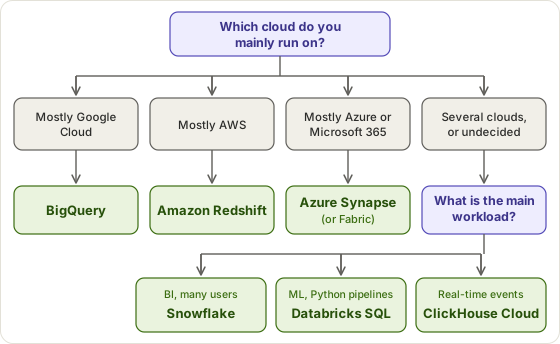
Start with the cloud you already pay for. Moving data between clouds costs time and egress fees, and each platform works best next to its own cloud's storage and identity tools. The table maps common needs to a best choice and a runner-up.
| If your team needs... | Best choice | Runner-up |
|---|---|---|
| Multi-cloud with no cloud lock-in | Snowflake | Databricks |
| Pure Google Cloud integration | BigQuery | Snowflake on GCP |
| Pure AWS integration | Redshift | Databricks |
| Pure Azure and Microsoft integration | Azure Synapse Analytics | Microsoft Fabric Data Warehouse |
| Data science, ML, and SQL on one platform | Databricks | Snowflake (with Cortex and Snowpark) |
| Real-time, high-concurrency event analytics | ClickHouse Cloud | BigQuery (streaming) |
| Ad-hoc exploration with no provisioning | BigQuery | Redshift Serverless |
| Lowest upfront cost or a free tier | BigQuery | Snowflake (trial credit) |
| Large-scale BI with consistent workloads | Snowflake | Redshift |
Snowflake vs BigQuery vs Redshift
These three get compared most, and they differ mainly in where they run and how they bill. BigQuery runs on Google Cloud and bills by data scanned unless you buy slots. Snowflake runs on all three major clouds and bills for warehouse running time. Redshift runs on AWS and bills by RPU-hour or node-hour, with reservations for steady loads. If your cloud is already decided, that decides most of the comparison. Snowflake vs Databricks is a different question, and it comes down to whether your team writes SQL for BI or Python for ML pipelines.
Moving Data In: Pipelines and Automation
Every platform here needs data loaded into it, and that work is easy to leave out of the budget. Managed connectors, orchestration, and transformation tools are billed apart from the warehouse, and the estimates in the next section do not include them. Sketch your sources and load schedule in the ETL Pipeline Mapper before you price tooling. Then read our guides to data warehouse automation tools, what data warehouse automation is, and data warehouse automation in business analytics to see what to evaluate.
Cloud Data Warehouse Pricing: What It Actually Costs
Here is one hypothetical workload run through each platform's list prices: a team of 5 to 10 analysts, 1 TB stored, and 10 TB scanned per month. On platforms billed by compute time, we assume compute runs 3 to 6 hours per business day over 22 days, with the smallest warehouse or base capacity.
| Platform | Estimated monthly cost | What drives it |
|---|---|---|
| ClickHouse Cloud (Basic) | $40 to $70 | 1 to 1.5 compute units at $0.2181 per unit-hour, plus $25.30 for storage. Production use moves to Scale, which costs more. |
| BigQuery (on-demand) | $70 to $80 | About $21 to $24 of storage plus roughly $50 to $56 for the TiB scanned beyond the free first TiB. |
| Azure Synapse (serverless) | $70 to $100 | 10 TB processed at about $5 per TB, plus roughly $20 of Azure storage. Compressed formats keep the bill down. |
| Redshift Serverless | $125 to $225 | 4 RPUs at $1.50 per active hour for 66 to 132 hours, plus about $25 of managed storage. |
| Snowflake (Standard) | $155 to $290 | An X-Small warehouse at $2 per credit for 66 to 132 hours, plus $23 of storage. Enterprise adds 50% to compute. |
| Databricks SQL (Serverless) | $210 to $395 | A 2X-Small warehouse at $2.80 per hour for 66 to 132 hours, plus about $23 of cloud storage. |
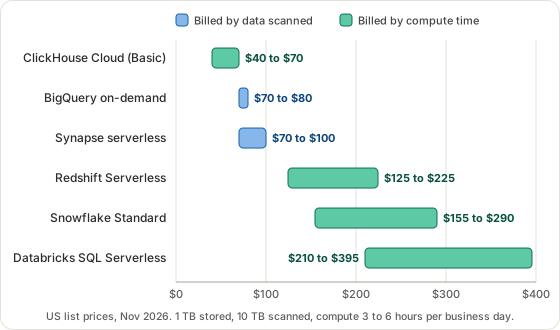
Read these as illustrations, not quotes. Real costs shift with query patterns, compression, partitioning, and hours of use. The estimates exclude data transfer, ingestion tools, support plans, and taxes. Scan-billed platforms charge nothing for idle hours but punish one careless query against an unpartitioned table. Time-billed platforms reward auto-suspend settings and punish warehouses left running overnight.
To model your own numbers, use the Data Warehouse ROI Calculator for payback and the Data Warehouse Sizing Calculator for storage and compute needs.
How to Choose and What to Do Next
- Pick by cloud first. If 80% of your data already lives in one cloud, start with that cloud's native warehouse.
- Match the workload. Dashboards for many users point to Snowflake or BigQuery, ML pipelines to Databricks, and sub-second event analytics to ClickHouse Cloud.
- Test on free credit. Take your ten slowest real queries and run them on BigQuery's monthly free tier, Snowflake's $400 trial, Redshift's $300 credit, or ClickHouse's $300 trial.
- Model the cost with your own numbers, then plan the migration. Paste your DDL into the SQL Schema Visualizer to check the physical schema, and write down column meanings with the Data Dictionary Generator. Our guide to what a data dictionary is covers the format.
The warehouse feeds your reporting layer, so it helps to know what business intelligence is and which tools sit on top. Our overview of data management tools shows what a wider shortlist can look like.
FAQ: Cloud Data Warehouses
What is the best cloud data warehouse?
There is no single best. The right choice depends on your workload and budget. Snowflake excels at multi-cloud flexibility and concurrent BI workloads. BigQuery is ideal for ad-hoc analytics with unpredictable query volumes and deep Google Cloud integration. Redshift suits AWS-native teams with consistent workloads. Databricks is best for ML and data science pipelines. ClickHouse Cloud leads for high-concurrency, real-time analytics. Azure Synapse is best for Microsoft-centric organizations.
What is the difference between a data warehouse and a data lake?
A data warehouse stores structured, processed data optimized for SQL queries and BI reporting. A data lake stores raw, unprocessed data in its native format, whether structured, semi-structured, or unstructured, and suits data science and machine learning. Modern platforms such as Databricks blur this boundary with the lakehouse architecture, which combines open storage formats with SQL analytics.
How much does Snowflake cost?
Snowflake charges separately for compute and storage. Compute is billed in credits per second, with a 60-second minimum each time a warehouse resumes. On AWS US East a credit costs $2 on Standard, $3 on Enterprise, and $4 on Business Critical. An extra-small virtual warehouse uses 1 credit per hour. On-demand storage is about $23 per TB per month on compressed data. Costs scale with warehouse size, the number of warehouses, and hours of use.
How does BigQuery pricing work?
BigQuery charges for both queries and storage. On-demand query pricing is $6.25 per TiB scanned, and the first 1 TiB each month is free. Active storage costs about $0.023 per GiB per month, and long-term storage after 90 days untouched drops to about $0.016 per GiB. The first 10 GiB of storage is free. Capacity pricing is an alternative, at $0.04 to $0.10 per slot-hour depending on edition. "You only pay for queries" is a common oversimplification, because storage charges accumulate independently.
What is the difference between Snowflake and Databricks?
Snowflake is built for structured SQL analytics and BI workloads, with strong multi-cloud support. Databricks is built for data engineering, machine learning, and data science, with native Spark and Python. Each has moved into the other's territory, with Databricks SQL for analytics and Snowflake Cortex for AI, but their core strengths remain distinct. If your team is mostly analysts and BI developers, Snowflake or BigQuery is simpler. If your team builds ML models and ETL pipelines in Python or Spark, Databricks is the better fit.
Is BigQuery or Snowflake better?
BigQuery is better for teams already in the Google Cloud ecosystem and for ad-hoc queries where workload volume is unpredictable. Snowflake is better for multi-cloud teams, since it runs on AWS, Azure, and Google Cloud, and for consistent, concurrent workloads where warehouse-level compute control matters. Neither is universally better. The right choice depends on your cloud provider, your team, and your query patterns.
What is the best cloud data warehouse for small businesses?
For small businesses, BigQuery and Snowflake both offer accessible entry points. BigQuery's free monthly allowance of 10 GiB of storage and 1 TiB of queries makes it easy to start at near-zero cost. Snowflake's 30-day, $400 trial and credit-based model let you scale up from minimal usage. ClickHouse Cloud also has a low entry cost for teams with high query volume but modest storage needs.
What is the best cloud data warehouse for real-time analytics?
ClickHouse Cloud is the leading choice for high-concurrency, low-latency real-time analytics, particularly for event data, advertising technology, and financial technology use cases. BigQuery with streaming ingestion supports real-time queries, though at a higher cost per query. Snowflake supports near-real-time loading through Snowpipe but suits near-real-time better than true sub-second analytics.
- Google Cloud. BigQuery pricing. cloud.google.com. On-demand per-TiB price, storage rates, free tier, and slot-hour prices by edition.
- Snowflake. Pricing guide. snowflake.com. Credit prices by edition and on-demand storage rates by region.
- Snowflake. Trial accounts. docs.snowflake.com. 30-day trial terms and the $400 credit.
- Amazon Web Services. Amazon Redshift pricing. aws.amazon.com. Provisioned and serverless pricing, managed storage, and reservations.
- Amazon Web Services. Amazon Redshift free trial. aws.amazon.com. $300 credit for first-time Serverless users.
- Amazon Web Services. Amazon Redshift introduces result caching for sub-second response for repeat queries. aws.amazon.com. November 2017 announcement.
- Databricks. Serverless DBU consumption by SKU. docs.databricks.com. DBUs per hour by SQL warehouse size.
- Databricks. Databricks Free Edition limitations. docs.databricks.com. Free Edition limits and non-commercial terms.
- Microsoft. Azure Synapse Analytics pricing. azure.microsoft.com. Dedicated pool, serverless, storage, and reserved capacity pricing structure.
- Microsoft. Smaller SKUs for Azure SQL Data Warehouse Gen2 are now available. azure.microsoft.com. December 2018 launch of DW100c.
- Microsoft. A turning point for enterprise data warehousing. blog.fabric.microsoft.com. Fabric Data Warehouse and the migration path from dedicated SQL pools. Vendor-authored.
- ClickHouse. ClickHouse Cloud pricing. clickhouse.com. Compute and storage rates by tier, and trial terms.