A data dictionary is structured documentation that describes the fields in a dataset or database. It records each field's name, meaning, data type, unit, allowed values, missing-value rules, and relationships — so anyone working with the data knows exactly how to read and use it. This guide covers what a data dictionary contains, why it matters, a full worked example, and how to create one.
This guide is part of the Data Analysis series. To generate a data dictionary from your own data, open the free AmriData Data Dictionary Generator.
What Is a Data Dictionary? (Quick Answer)
A data dictionary is a reference that describes the fields in a dataset or database. It lists each field's name, meaning, data type, format, allowed values, units and rules for missing or invalid data. Analysts use data dictionaries to understand what columns represent, avoid inconsistent interpretations, and make data easier to clean, analyze and share. In database systems, the term can also refer to automatically maintained metadata about tables, columns, constraints and other database objects.
Generate a Data Dictionary → · Data Analysis Guides
Why Column Names Are Not Enough
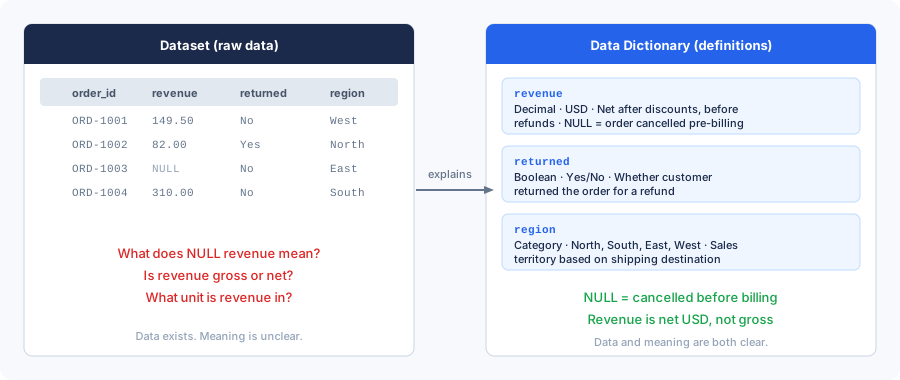
Open any dataset and you will find a column named revenue. But revenue alone tells you almost nothing. Is it gross revenue or net? Does it include taxes? Has it been reduced by refunds? Is it in USD, EUR, or thousands of dollars? If your teammate calculated profit using gross revenue while you used net, you both produced numbers that look legitimate and are completely incompatible.
That gap between a column name and its actual meaning is exactly what a data dictionary fills. Instead of relying on tribal knowledge — or making assumptions that turn out wrong three months into a project — you document the facts once, in one place, where everyone can find them.
What Does a Data Dictionary Contain?
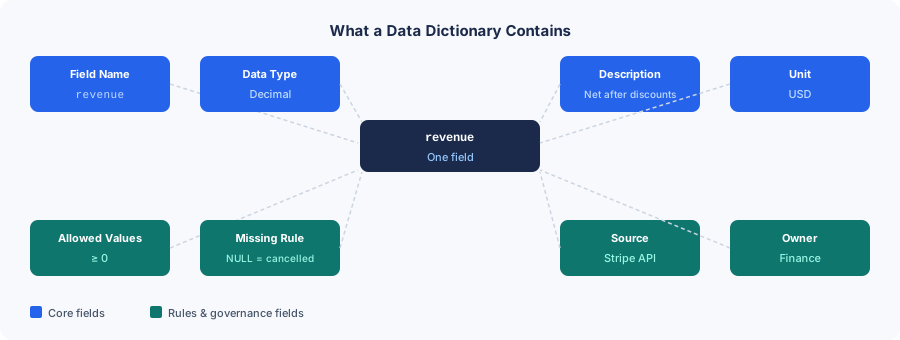
No two dictionaries look identical, but most useful ones share a common set of fields. For each column in your dataset, you document as many of the following as apply.
Field name
The exact column or variable name as it appears in the dataset — order_id, not "Order ID" or "order identifier." Keeping the technical name here means analysts can copy it directly into a query without guessing at case or spelling.
Description
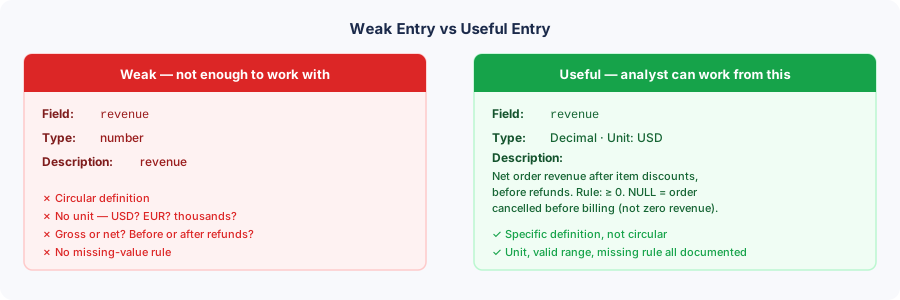
A plain-language explanation of what the field measures or represents. A weak entry says "revenue" to describe a field already called revenue. A useful entry says: "Net recorded order revenue after item-level discounts, before any refunds, in USD." The description should answer "what does this actually capture?" without requiring the reader to inspect the data.
Data type
The stored or analytical type: integer, decimal, string, date, datetime, boolean, or categorical. Worth noting that a stored type does not always match the field's analytical role. A customer_id column may contain integers, but it is still an identifier — you should not calculate a mean customer ID or treat it as a quantity.
Format and unit
For dates: the format (YYYY-MM-DD) and timezone (UTC). For numeric fields: the unit (USD, kg, seconds, percentage points). A column labeled weight containing the value 10 is ambiguous until you record whether that means kilograms, pounds, or grams. Numbers without units cause real analytical errors.
Allowed values
For categorical fields: the full set of valid options and what each one means. For numeric fields: a valid range. Your order_status column might allow pending, paid, shipped, cancelled, refunded — but if that mapping is not written down, an analyst seeing C or 3 has no reliable way to know which status it represents.
Missing-value rules
This may be the most underrated field in any dictionary. A blank cell, a NULL, NA, -999, or the string unknown can each mean something different. For the refund_amount column, NULL might mean no refund occurred, or it might mean the refund amount was not captured. These are different interpretations that produce different calculations. Document which one applies.
Missing is not zero. Treating a missing refund amount as $0 means you undercount refunds. Treating a missing satisfaction score as a valid response means you skew averages. The dictionary should say exactly what absence means for each field.
Keys and relationships
Record whether a field is a primary key, foreign key, or a non-unique identifier. This helps analysts understand row grain — what a single row represents — and how tables relate to each other.
Source and owner
For datasets used in business settings: where the field comes from (Stripe API, CRM export, manual survey upload) and who is responsible for its definition and quality. When a definition changes or a discrepancy appears, the owner field tells you whom to call.
Derived fields and formulas
If a column is calculated from other columns, document the exact formula. A vague description like "profit calculation" is not useful. A precise one — profit = revenue − cost — lets any analyst reproduce the number. For rate metrics, record both numerator and denominator. A conversion_rate means nothing unless you know it is completed_orders ÷ eligible_sessions.
Minimum useful set
For a small analytical dataset, six fields are enough to get started: field name, description, data type, valid values or range, missing-value meaning, and unit where applicable. Add keys, source, owner, sensitivity, and example values as the dataset grows or is shared more widely.
Data Dictionary Example
The table below documents a synthetic ecommerce orders dataset. One row in this dataset represents one order. Without the dictionary, it is not obvious that customer_id is an identifier rather than a measure, that revenue is net of discounts but before refunds, or that returned is a boolean flag rather than a count of returned items.
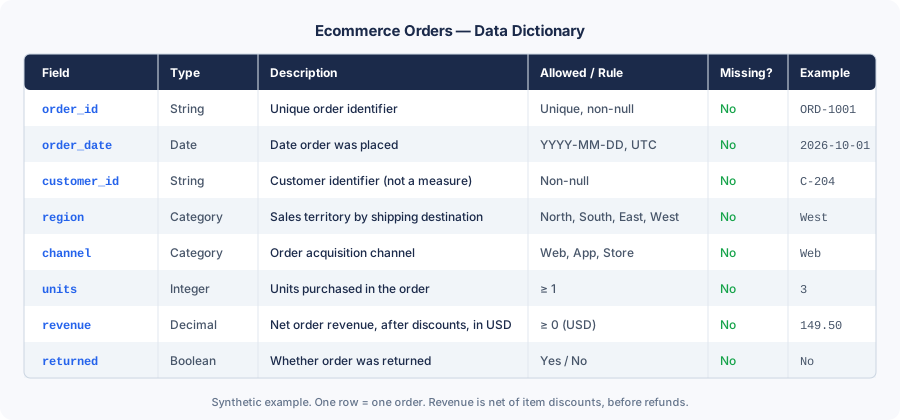
| Field | Type | Description | Allowed / Rule | Missing? | Example |
|---|---|---|---|---|---|
order_id |
String | Unique order identifier. Not a measure — do not average. | Unique, non-null | No | ORD-1001 |
order_date |
Date | Date order was placed. Format: YYYY-MM-DD, UTC. | YYYY-MM-DD | No | 2026-10-01 |
customer_id |
String | Customer identifier. Not a quantitative variable — do not sum or average. | Non-null | No | C-204 |
region |
Category | Sales territory based on shipping destination. | North, South, East, West | No | West |
channel |
Category | Order acquisition channel. | Web, App, Store | No | Web |
units |
Integer | Number of units purchased in the order. | ≥ 1 | No | 3 |
revenue |
Decimal | Net order revenue after item discounts, before refunds. Unit: USD. NULL = order cancelled before billing — not zero revenue. | ≥ 0 (USD) | Yes (NULL = cancelled) | 149.50 |
returned |
Boolean | Whether the order was returned. Values: Yes/No — not a count. | Yes / No | No | No |
Without this documentation, an analyst might treat returned = 0 as a count of zero returned items instead of a boolean "No." They might sum customer_id by accident, or interpret a NULL revenue as $0 rather than a cancelled order. The dictionary prevents all three errors before they happen.
Is a Data Dictionary the Same as Metadata?
A data dictionary contains metadata — that part is accurate. Metadata is any information that describes data: file size, creation date, column types, lineage, ownership, quality scores. But metadata is much broader than a data dictionary. A data dictionary is one specific, structured form of metadata focused on field-level definitions and rules.
| Metadata | Data Dictionary |
|---|---|
| Broad: describes data, systems, files | Focused on field-level definitions |
| Includes file size, creation date, lineage | Lists types, units, allowed values, rules |
| Covers ownership, access controls, quality | Documents what each field means for analysis |
| Can be system-generated automatically | Often requires human input for business meaning |
| Not always structured as a table | Usually structured as a table or schema |
The relationship is one of containment: a dictionary uses metadata, but metadata encompasses far more than what a dictionary records. When someone says "add metadata to your dataset," they may mean anything from file-level tags to a full field-level dictionary.
What Is a Data Dictionary in a Database?
In database systems, "data dictionary" can refer to something different from the analyst's spreadsheet-style reference. Many database management systems (DBMS) maintain an internal data dictionary — a set of system tables or views that the database itself uses to track its own structure. These records describe the objects that make up the database: tables, columns, views, indexes, constraints, users, and permissions.
Oracle's documentation, for instance, describes its data dictionary as read-only reference tables and views containing metadata about the database. A database administrator can query these views to see which tables exist, what columns they contain, what constraints are applied, and which users have access. Other systems, including PostgreSQL and SQL Server, expose similar information through INFORMATION_SCHEMA views, though implementations vary.
| System (database) dictionary | Analyst / dataset dictionary |
|---|---|
| Maintained automatically by the DBMS | Created and curated by people or tools |
| Describes database objects (tables, columns, constraints) | Describes analytical meaning of fields |
| Technical metadata: types, keys, defaults, privileges | Business metadata: definitions, units, valid values, owners |
| Used by DBAs, developers, and the system itself | Used by analysts, researchers, and business users |
| Accurate about structure; no knowledge of business meaning | Requires domain knowledge that tools cannot infer |
These two uses overlap. A system dictionary might tell you that a column is a decimal with a default of 0 — but it cannot tell you whether that decimal represents gross or net revenue, what currency it uses, or what a NULL value means in business terms. That human-readable context lives in the analyst's dictionary, not the system's.
Data Dictionary vs Related Concepts
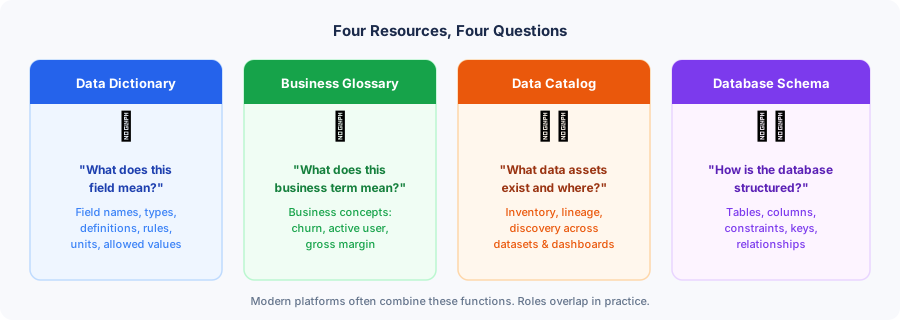
Data dictionary vs database schema
A database schema describes structural organization: which tables exist, how they relate, what constraints apply, what types columns hold. A data dictionary explains what those structures mean — business definitions, units, allowed values, ownership, and analytical rules. They overlap significantly, but a schema alone does not tell you that a decimal column represents net revenue in USD, or that a NULL means "cancelled before billing." That context comes from the dictionary.
Data dictionary vs data catalog
A data catalog operates at a broader organizational level — inventorying and indexing data assets (tables, dashboards, models, reports) across an entire organization so teams can discover what data exists and where it lives. A data dictionary focuses more narrowly on field-level definitions for a specific dataset or database. The two can exist side by side: a catalog might link to individual data dictionaries as documentation for each asset. In practice, many modern catalog tools include dictionary functionality.
Data dictionary vs business glossary
A business glossary defines the organization's vocabulary: what "active customer" means, how "churn" is calculated, what counts as "gross margin." These are business concepts, not database columns. A data dictionary defines the actual fields that implement those concepts: is_active_customer, churn_flag, gross_margin_pct. In a well-governed organization, each field in the dictionary should reference the glossary definition it implements — keeping technical documentation and business terminology aligned.
Data dictionary vs codebook
Research and survey datasets often use the term "codebook" for what functions as a data dictionary — a document that records variables, coding schemes, survey questions, response codes, and study context. Functionally, they serve the same purpose. The terminology differs more by discipline than by role: social scientists say codebook, data engineers say data dictionary. If you encounter one, treat it as the other.
Data dictionary vs README
A README typically describes the dataset as a whole: its purpose, how it was collected, what files it contains, and how to use it. A data dictionary documents individual fields. Both belong together for any shared dataset — the README provides context about the whole; the dictionary provides precision about each part.
Why Is a Data Dictionary Important?
Field documentation is often treated as a nice-to-have that teams get around to eventually. In practice, missing documentation creates real costs — time spent tracking down what a column means, analytical errors from wrong assumptions, and disagreements between teams using the same field differently.
Consistent interpretation across teams
Without a dictionary, marketing might define "customer" as anyone who has ever placed an order, while finance defines it as anyone with a paid invoice in the last 12 months. Both teams' reports look accurate internally while producing completely different numbers. A dictionary surfaces that disagreement. It does not automatically resolve it — but making it visible is the first step toward alignment.
Faster onboarding
A new analyst on the team can read the dictionary and understand the dataset without spending a day asking colleagues what each column represents. This matters especially when the person who built the dataset has moved on. Documentation outlasts individuals. For more on getting started with a dataset, see the guide on exploratory data analysis steps.
Better data cleaning
Documented valid ranges and allowed values give you a baseline to check against. If the dictionary says satisfaction_score should fall between 1 and 5, a value of 7 is immediately flagged as a problem rather than silently included in your average. The AmriData data cleaning feature works most effectively when the expected structure of your data is clear.
Reproducible analysis
When units, formulas, definitions, and missing-value rules are documented, another analyst can reproduce the work without having to reverse-engineer the original author's assumptions. This is foundational for any analysis that will be audited, handed off, or repeated. Reproducibility is covered in more depth in the guide on data analysis methods.
Better AI-assisted analysis
AI tools interpret data more reliably when supplied with clear field definitions, units, row grain, and business rules. Providing an AI tool with a data dictionary alongside your dataset reduces the chance of misinterpretation and improves the quality of generated insights. See how this works in practice in the guide on AI for data analysis.
Data governance support
A dictionary that records owners, sensitivity classifications, and definitions contributes directly to an organization's data governance program — establishing accountability for each field and making audits more tractable. Governance requires more than a dictionary alone, but a dictionary is often the foundation everything else builds on.
Limitations to Know
A data dictionary is only useful if it stays accurate. An outdated dictionary can be worse than none at all, because analysts read the definition, trust it, and build their work on a description that no longer matches the data.
Stale documentation creates confident wrong analysis. When the dictionary says revenue is net of discounts but the underlying data changed to gross six months ago, every analysis built on that definition is silently wrong. Assign an owner, record a version date, and review when the data changes.
Automated tools — including the AmriData Data Dictionary Generator — can inspect your data and infer structure: column types, null counts, unique value counts, sample values. These profiling results are genuinely useful starting points. They cannot infer business meaning. A tool can see that revenue is a decimal — it cannot know whether that decimal represents gross or net revenue, what currency applies, or what a NULL means in your organization's context. That knowledge has to come from people who understand the data.
How to Create a Data Dictionary
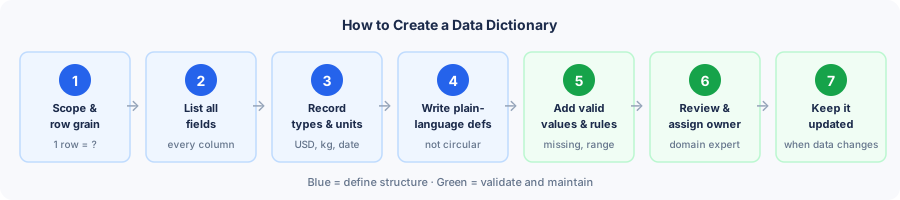
Step 1: Define scope and row grain
Before documenting any column, state which dataset or table this dictionary covers, and what one row represents. "One row = one order" is different from "one row = one order line item" — and the difference changes every count, sum, and join you perform. Write this at the top of your dictionary, not buried in a footnote.
Step 2: List every field
Inventory all columns, including identifier fields and derived columns that analysts often overlook. If a field appears in the dataset, it needs a definition — even if that definition is simply "unique row identifier, not a measure."
Step 3: Record types and units
Use the actual stored or observed type, not what you expect the column to be. Note the unit for every numeric field. For date fields, record the format and timezone. If your spreadsheet infers types from the data, verify them — a CSV column of dates stored as strings is still a string type until you document otherwise.
Step 4: Write plain-language definitions
A definition should answer "what does this field measure or represent?" without the reader needing to look at the data. Avoid circular definitions. "Region = region" tells nobody anything. "Region = sales territory based on the shipping destination at the time of order" is a definition.
Step 5: Document valid values and missing rules
For categorical fields: list every valid code or label and what it means. For numeric fields: record the valid range. Then, separately, document what each form of missing data means — NULL, blank, -999, and unknown may each mean something different in your dataset.
Step 6: Add formulas, keys, and relationships
For derived fields: write the exact formula. For rates: write both numerator and denominator. For relational datasets: note primary and foreign keys so analysts understand how tables join. This information belongs in the dictionary, not in someone's head.
Step 7: Assign an owner and review with domain experts
Before publishing, have the person most familiar with the data read every definition. They will catch the errors a tool cannot — the wrong unit, the outdated category code, the field whose meaning changed after a system migration. Record the owner's name so future readers know whom to contact when something does not look right.
Step 8: Keep it updated
A dictionary should be updated whenever fields are added or removed, meanings change, valid values expand, formulas are revised, or the data source changes. Record a version date or last-modified date so readers know how recent the documentation is. For critical datasets, schedule periodic reviews.
Create a Data Dictionary with AmriData
The AmriData Data Dictionary Generator gives you a structured starting point by profiling your dataset automatically. Paste cells from Excel or Google Sheets, or import a CSV/TSV file, and the tool inspects your columns — inferring types, counting missing values, identifying unique counts, and surfacing example values. You then edit each field's definition, add units and allowed values, document missing-value rules, and record any context the tool cannot infer.
The workflow is intentionally two-phase: let the tool handle the structural observation, then apply your domain knowledge to add meaning. Automated profiling tells you that revenue is a decimal with 3% null values and a minimum of 0 — it cannot tell you that those nulls represent cancelled orders or that the decimal is in US dollars. That second step is always human work.
Open Data Dictionary Generator →
Data Dictionary Template
Copy this structure into a spreadsheet, a separate worksheet in your workbook, or a documentation file. Add or remove columns based on how much governance detail your project requires.
| Field name | Description | Type | Format / Unit | Allowed values | Missing rule | Key / Relation | Source | Owner | Notes |
|---|---|---|---|---|---|---|---|---|---|
| e.g. revenue | What it means | Decimal | USD | ≥ 0 | NULL = cancelled | — | Stripe API | Finance | Before refunds |
| [your field] | [your definition] | [type] | [unit] | [valid range] | [missing rule] | [key?] | [source] | [owner] | [caveats] |
For small analytical projects, a simpler version works: field name, meaning, type, example, and notes. The full template above suits shared datasets, production databases, or any data used for important decisions.
Data dictionary in Excel
A practical pattern for spreadsheet-based datasets is to maintain the data dictionary as a dedicated worksheet within the same workbook. A typical workbook might include Raw_Data, Clean_Data, Data_Dictionary, and Analysis tabs. This keeps documentation physically adjacent to the data. Avoid scattering definitions in scattered cell comments — they are hard to find and impossible to share cleanly. See Excel data analysis for more on structuring analytical workbooks.
Data dictionary for CSV files
CSV files contain values and nothing else — no types, no constraints, no metadata. A separate dictionary is especially valuable here because the file itself offers no structural information beyond column headers. Software loading your CSV will guess types from the data, and those guesses are often wrong. A dictionary file alongside the CSV tells every user and every tool what to expect before they load a single row.
Best Practices
Keep these principles in mind when writing and maintaining a dictionary.
- Avoid circular definitions. If the field is named
status, the description cannot say "the status." Describe what each possible status value means. - Always record units. A numeric field without a unit is ambiguous. Revenue in what currency? Weight in what unit? Time in seconds or milliseconds?
- Separate missing from zero. Document what absence means for every field, and make clear whether a missing value, zero, and null each carry distinct interpretations.
- Define every category code. If your data uses codes — 1, 2, 3 or A, B, C — map every code to its meaning. Do not make users guess.
- Document derived formulas precisely. Vague descriptions of calculated fields ("some revenue calculation") produce undiscoverable bugs. Write the exact formula.
- Record rate denominators. A conversion rate needs its numerator and denominator. Document both.
- State row grain prominently. What does one row represent? Put this at the top of the dictionary, before any field definitions.
- Keep technical field names. Do not replace
customer_idwith "Customer Identifier" as the field name. Analysts need the exact name to write queries. - Review generated definitions. Automated tools profile structure; they do not know business meaning. Have a domain expert read every definition before the dictionary is shared.
- Assign ownership and version it. A dictionary without an owner and a last-modified date becomes untrustworthy as the data changes.
Common Mistakes
Circular definitions
Writing region = region or status = the status of the order. Fix: describe what each value means in plain terms.
Missing units on numeric fields
A column labeled weight = 10 could mean kg, lb, or g. Always record the unit.
No missing-value rule
Blank or NULL treated as zero by analysts who were never told otherwise. Fix: explicitly document what absence means for every field.
Numeric IDs treated as measurements
Averaging a customer_id column is meaningless. Mark identifiers clearly as non-quantitative.
No row grain statement
Analysts count rows assuming each is a unique customer, when each row is actually a unique order. Fix: put "one row = one order" at the top.
Vague derived-field descriptions
Profit described as "some revenue calculation." Fix: write the exact formula every time.
Rates without denominators
Documenting conversion_rate without stating it is completed_orders ÷ eligible_sessions. Fix: always name numerator and denominator.
Treating inferred structure as business meaning
Accepting a tool's type inference as the complete definition. Fix: add units, descriptions, and missing rules that tools cannot infer.
Outdated documentation
A field definition that describes the data as it was two years ago. Fix: assign an owner, record a version date, review when the data changes.
Sensitive data in examples
Including real email addresses, account IDs, or personal names in example values. Fix: use synthetic data in all public-facing dictionary examples.
Frequently Asked Questions
What is a data dictionary in simple terms?
A reference document that explains what each column in a dataset or table means — its type, unit, valid values, and any rules for missing data. Think of it as the instruction manual for your data.
What is the difference between a data dictionary and metadata?
A data dictionary contains metadata, but metadata is broader. Metadata covers any information describing data — file size, lineage, access controls, creation timestamps. A data dictionary is a specific, structured form of metadata focused on field-level definitions and analytical rules.
What is a data dictionary in a database?
In database systems, it can refer to the system-maintained tables or views that describe database objects — tables, columns, constraints, users, and permissions. Oracle, PostgreSQL, and SQL Server all maintain internal data dictionaries of this kind. This is distinct from, but related to, the analyst-facing documentation that explains what fields mean.
Is a data dictionary automatically generated?
Partially. Tools can automatically infer column types, count missing values, identify unique counts, and surface example values. Those tools cannot infer business meaning — what a NULL represents, what currency a number uses, or whether "active" means active in the last 30 days or 12 months. Human review is always needed for a complete dictionary.
What is the difference between a data dictionary and a data catalog?
A data catalog operates at the organizational level — inventorying and indexing all data assets (tables, dashboards, models) so teams can discover what exists and where. A data dictionary focuses on field-level definitions for a specific dataset. Many catalog platforms include dictionary features; conceptually they serve different purposes.
What is the difference between a data dictionary and a business glossary?
A business glossary defines concepts: what "active customer" or "gross margin" means to the organization. A data dictionary defines the actual fields that implement those concepts: is_active_customer or gross_margin_pct. In a well-governed organization, the two reference each other.
What is the difference between a data dictionary and a database schema?
A schema describes structural organization — which tables exist, their relationships, column types, and constraints. A data dictionary explains what those structures mean: business definitions, units, valid values, and analytical rules. A schema without a dictionary tells you that revenue is a decimal; a dictionary tells you it is net USD revenue before refunds.
Who creates a data dictionary?
Typically a data analyst, data engineer, or database administrator creates the structural parts, then collaborates with domain experts (finance, marketing, product) to write accurate business definitions. The best dictionaries combine technical knowledge and domain knowledge.
Can Excel be used for a data dictionary?
Yes. A dedicated worksheet in your workbook — separate from the data — works well for small datasets. Use proper column headers, keep one row per field, and include the field name exactly as it appears in the data. See Excel data analysis for more on organizing analytical workbooks.
How often should a data dictionary be updated?
Whenever fields are added, removed, or redefined; when valid values or formulas change; when the data source changes; or when a business rule is revised. For critical datasets, a periodic review (regardless of changes) helps catch definitions that have drifted from reality.
What is the minimum information a data dictionary needs?
For a small analytical dataset, six fields are enough to get started: field name, description, data type, valid values or range, missing-value meaning, and unit where applicable. Add keys, source, owner, sensitivity, and example values as the dataset grows or is shared more widely.
What is a data dictionary vs a codebook?
A codebook — common in survey research and social science — documents variables, coding schemes, response codes, and study context. It functions as a data dictionary under a different name. The terminology differs by discipline rather than by purpose; treat them as equivalent.
Key Takeaways
- A data dictionary is structured documentation that explains what the fields in a dataset or database mean and how they should be interpreted.
- A useful dictionary goes beyond column names — it records types, definitions, units, allowed values, missing-value rules, keys, formulas, and ownership.
- Missing is not zero. Every dictionary should document what absent, null, or placeholder values represent for each field.
- Row grain matters as much as column definitions. State what one row represents before documenting any field.
- In database systems, "data dictionary" can also refer to system-maintained metadata about tables, columns, and constraints — different from the analyst-facing reference.
- Automated tools profile structure — types, null counts, example values. They cannot infer business meaning, which requires human review.
- A dictionary relates to metadata (it contains it), a schema (it explains what schema describes), a catalog (narrower in scope), and a glossary (it implements glossary concepts at the field level). All four are distinct.
- Stale documentation is dangerous. Assign an owner, record a version date, and update when the data changes.