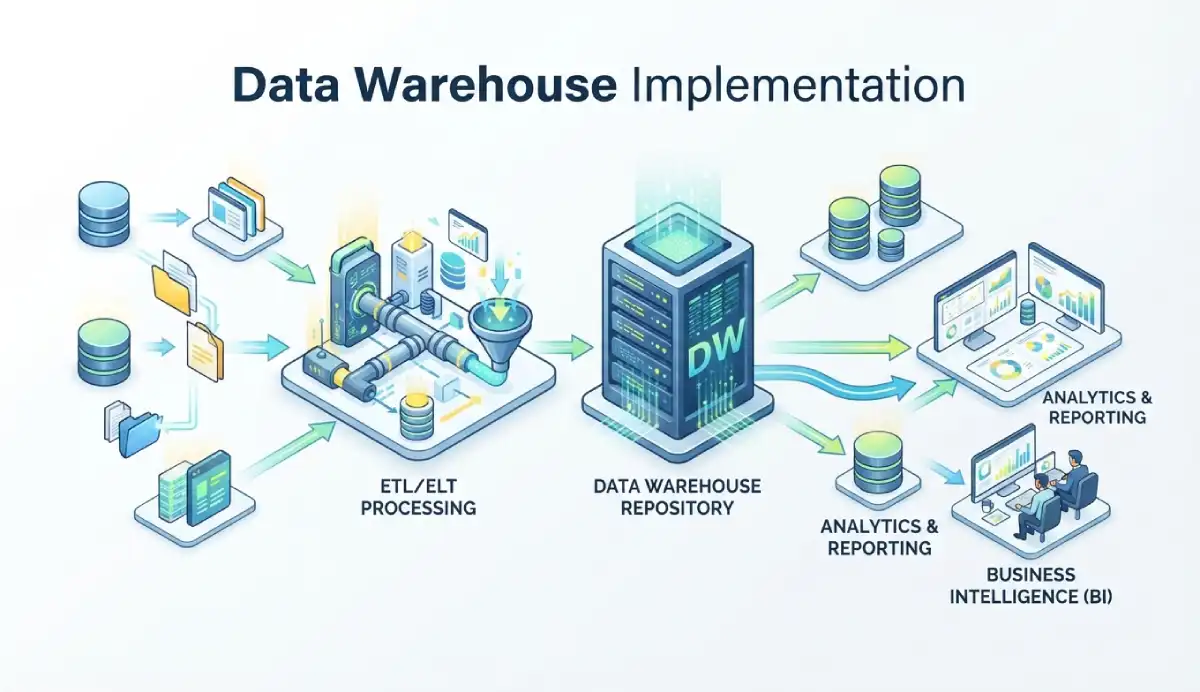
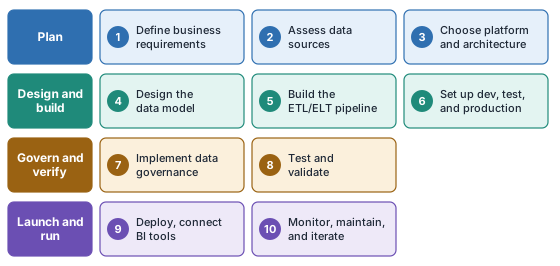
Data warehouse implementation is a ten-step build: define requirements, assess sources, choose a platform, model the data, build pipelines, set up environments, add governance, test, deploy, and monitor. A small project can go live in 2 to 4 months for $30,000 to $80,000. An enterprise project can run 9 to 18 months and cost $400,000 to $1,000,000 or more. This guide, part of our Data Analysis series, covers each step with the decisions to make, the mistakes to avoid, and honest estimates for time, cost, and team size. If you still need the design background, read building a data warehouse first and come back here for the build.
Quick answer: the ten steps of data warehouse implementation are:
- Define business requirements
- Assess data sources
- Choose architecture and platform
- Design the data model
- Build the ETL/ELT pipeline
- Set up environments (dev, staging, production)
- Implement data governance
- Test and validate
- Deploy and connect BI tools
- Monitor, maintain, and iterate
Scoping a project? Estimate storage and compute in the Data Warehouse Sizing Calculator → before you write the plan.
What Is Data Warehouse Implementation?
Data warehouse implementation is the project that takes a warehouse from an idea to a working system: gathering requirements, choosing a platform, modeling the data, loading it, testing it, and putting it in front of users. It ends when the business can run real reports on trusted data. Running the warehouse after that point is operations, and it has a different budget and a different team.
This guide assumes you already know what a warehouse is and why you want one. If you need the concepts first, our guide to building a data warehouse covers the design side. This page covers the order of work, who does it, how long it takes, and what it costs.
Before You Begin: Key Decisions That Shape the Implementation
Three choices made in the first weeks decide most of what follows. Settle them before step 1 turns into step 4.
Cloud-Native vs. On-Premises vs. Hybrid
For most teams, a managed cloud platform is the right default. You skip hardware, scale storage and compute separately, and pay for what you use. Choose on-premises or hybrid only when a compliance rule bars cloud storage, when you already own a data center that makes the economics work at very high volume, or when part of your data must stay on site.
Kimball vs. Inmon Methodology
Kimball builds bottom-up: you deliver one subject-area data mart at a time, each shaped as a dimensional model. Inmon builds top-down: you first create a normalized enterprise warehouse, then derive marts from it. Kimball reaches the first useful report sooner. Inmon gives stronger consistency across a large organization but takes longer to show results. Most modern cloud projects use a Kimball-style approach.
Star Schema vs. Snowflake Schema
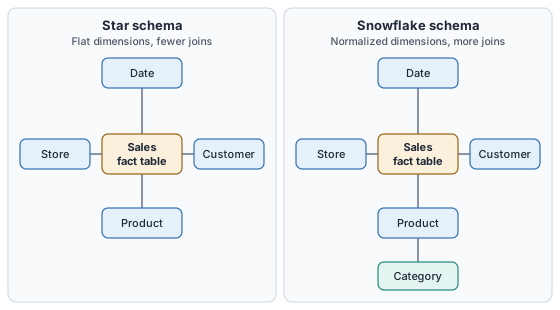
A star schema joins one fact table straight to flat dimension tables. A snowflake schema splits those dimensions into sub-tables, so a Product dimension might point to a separate Category table. Star means fewer joins and simpler BI queries. Snowflake saves some storage and keeps dimension attributes in one place, at the cost of more joins. A fact constellation, also called a galaxy schema, is a different idea: several fact tables that share the same dimensions, such as sales and inventory both using Product and Date. The two names describe the same design.
The 10-Step Data Warehouse Implementation Process
Each step below lists what the work involves, the decision you have to make, and the mistake that hits teams most often at that stage.
Step 1: Define Business Requirements
Start with the questions the warehouse must answer, not the data you happen to have. List the reports, the KPIs behind them, who reads them, and how fresh the numbers need to be. Interview the people who will use the output, not only the people who own the source systems. The deliverable is a short requirements document that names the first subject area and says what is out of scope.
Use the Data Warehouse Sizing Calculator here to turn row counts and growth rates into a first storage and compute estimate. It gives the platform and budget conversations a number to start from.
Common mistake: loading data before anyone has said what it is for. The result is a technically complete warehouse that nobody opens.
Step 2: Assess Your Data Sources
Catalog every source: operational databases, CRM, ERP, SaaS tools, flat files, event streams. For each one, record the format, volume, update frequency, owner, and known quality problems. This inventory sets the real size of the pipeline work in step 5.
Profile the data before you design anything. Check null rates, duplicate keys, inconsistent codes, and date formats. The Missing Value Checker gives a fast first pass on a sample file, and our guide to handling missing data explains what to do with what you find.
Common mistake: trusting the source system's documentation instead of its data. Profiling usually turns up problems the documentation never mentions.
Step 3: Choose Architecture and Platform
Pick the platform: Snowflake, Google BigQuery, Amazon Redshift, Databricks SQL, Azure Synapse Analytics, or ClickHouse Cloud are the usual shortlist. Start with the cloud your data and identity tools already live in, then match the platform to the workload: shared BI, ML pipelines, or real-time events. Our best cloud data warehouse comparison gives list prices, free tiers, and fit for all six.
Model the cost before you commit. The Data Warehouse ROI Calculator shows payback under your own assumptions, so you are comparing totals and not just per-credit prices. Keep in mind that a BI tool or a spreadsheet-style database is not a warehouse, however well it connects to your data.
Common mistake: choosing on a benchmark. Run your ten slowest real queries on free trial credit instead.
Step 4: Design the Data Model
This is the step that decides whether the warehouse is pleasant or painful to use. You define fact tables, dimension tables, surrogate keys, and a strategy for history. Data modeling is led by a data architect, usually with data engineers and business analysts who know the reporting needs. Data scientists are consumers of the finished warehouse, not the people who design its schema. Our guide to what a data architect does covers who owns this work.
Start by declaring the grain of each fact table. Data granularity is the level of detail one row represents: a single transaction, a daily summary, or a weekly total. It is one of the most consequential choices in the model, because you cannot get detail back once you have aggregated it away. Use surrogate keys, meaning meaningless integers generated by the warehouse, as primary keys. Business keys change, get reused, and collide across source systems.
Then decide how each dimension handles change. These are the three slowly changing dimension (SCD) types you will use most:
- SCD Type 1 (overwrite): replace the old value. Use it when only the current state matters, such as a corrected typo or a current list price.
- SCD Type 2 (add a row): keep every version with start and end dates. Use it when history must stay accurate, such as a customer's address or sales region at the time of each order.
- SCD Type 3 (add a column): store the current and previous value side by side. Use it when you only ever compare the two.
Sketch the model before you build it. The Star Schema Designer lets you lay out facts and dimensions visually, and the SQL Schema Visualizer draws the physical schema from your DDL so you can catch broken joins before load.
Common mistake: skipping the SCD decision. Teams that overwrite everything discover later that last year's revenue now sits in the wrong region.
Step 5: Build the ETL/ELT Pipeline
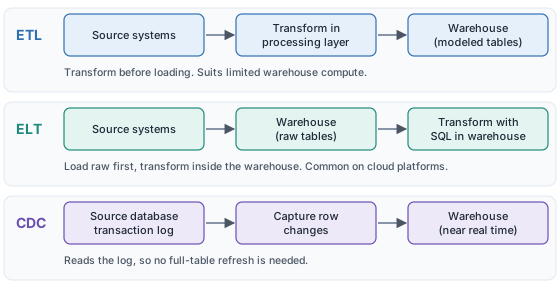
The pipeline moves data from sources into the model. Three patterns matter, and most real warehouses use more than one:
- ETL (extract, transform, load): transform data in a separate processing layer, then load the finished tables. It suits cases where the target has limited compute or the transformations are heavy.
- ELT (extract, load, transform): load raw data first, then transform it with SQL inside the warehouse. It is the usual choice on Snowflake, BigQuery, and Redshift, where compute is elastic. Tools such as dbt handle the transform step as versioned SQL.
- CDC (change data capture): read the source database's transaction log to catch inserts, updates, and deletes as they happen, then apply only those changes. It is far cheaper than refreshing a full table when the source is large or changes often. Debezium, Airbyte, and Fivetran all offer CDC connectors.
Write down every transformation rule and the business logic behind it. Map sources to targets in the ETL Pipeline Mapper before you write code, since it is much cheaper to fix a mapping than a deployed job. To cut manual pipeline work, read what data warehouse automation is and the roundup of data warehouse automation tools.
Common mistake: burying business rules in undocumented code. Whoever inherits the pipeline cannot tell a rule from a bug.
Step 6: Set Up Environments
Create separate development, staging, and production environments, and promote changes through them in that order. Never develop or test against production. Give each environment its own permissions: developers get wide access in dev, narrow access in staging, and almost none in production. Keep the same schema definitions in version control so an environment can be rebuilt from scratch.
Common mistake: building directly in production "just for the first release." That shortcut tends to become permanent.
Step 7: Implement Data Governance
Data governance is not documentation you write after the warehouse is built. It is a structure you design before the first table is created. That means named data owners, quality rules, lineage tracking, role-based access control (RBAC), and a data dictionary covering every table, field, and transformation. Build in any compliance needs, such as GDPR or HIPAA, from the start. Retrofitting access rules and lineage onto a live warehouse is far more expensive than designing them in.
Generate the first draft of your dictionary with the Data Dictionary Generator and keep it current as the model changes. Our guide to what a data dictionary is explains the format, and the overview of data management tools covers catalog and lineage options.
Common mistake: treating governance as a late-phase task for the compliance team. By then the model has already baked in the gaps.
Step 8: Test and Validate
Test at every layer: source, staging, and final tables. The checks that catch the most problems are:
- Row counts reconciled against the source
- Aggregates such as total revenue compared with a known source figure
- Uniqueness of the declared grain, so no fact row is duplicated
- Referential integrity, so every fact row finds its dimension row
- SCD behavior, by changing a source value and confirming that the history is right
- Query speed under realistic data volumes and concurrent users
Test each transformation on its own before you test the pipeline end to end. A failure in an end-to-end run is much harder to trace. Have the business analysts sign off on the numbers, since they know which totals look wrong.
Common mistake: performance testing on a sample. A query that is fast on 1 million rows can fail on 1 billion.
Step 9: Deploy and Connect BI Tools
Promote the tested build to production, connect your BI platform (Tableau, Power BI, Looker, or Metabase), and configure access for end users. Training matters as much as the connection. People who do not trust or understand the model go back to their spreadsheets. If you are new to the reporting layer, start with what business intelligence is, and see how a data analysis dashboard turns warehouse tables into something people read.
Common mistake: launching to everyone at once. Release to one team, fix what they find, then widen access.
Step 10: Monitor, Maintain, and Iterate
Set up pipeline monitoring, alerts for failed or late loads, and data freshness checks. Schedule regular data quality audits, tune slow queries as volumes grow, and plan for schema changes, because the business will keep asking new questions.
Monitoring is separate from backup, and backup is separate from availability. Backups protect against data loss: if data is deleted or corrupted, a backup lets you restore it. High availability protects against downtime: it uses redundant nodes, automatic failover, and multi-zone replication so that when one component fails, another takes over. Four-nines uptime (99.99%) leaves about 53 minutes of downtime a year, and only an HA design can deliver it. Never conflate the two.
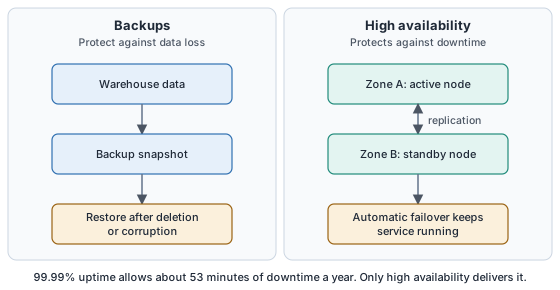
Cloud platforms such as Snowflake, BigQuery, and Redshift build much of the HA layer in, but you still need to know which part you are relying on and which you must configure.
Common mistake: counting nightly backups as an uptime plan.
Data Warehouse Implementation Timeline
How long a project takes depends mostly on the number of sources and the number of subject areas. These ranges assume a dedicated team.
| Scope | Sources | Use cases | Estimated timeline |
|---|---|---|---|
| Small / PoC | 1 to 3 | 1 subject area | 2 to 4 months |
| Mid-size | 5 to 10 | 3 to 6 data marts | 4 to 8 months |
| Enterprise | 20+ | Full organization, complex governance | 9 to 18 months |
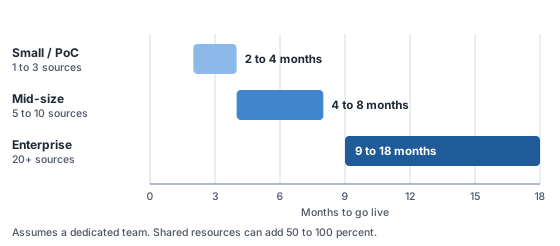
Note: as a rule of thumb, part-time or shared resources extend these timelines by 50 to 100 percent. Unclear requirements are the most common cause of overruns, which is why step 1 comes first.
Data Warehouse Implementation Cost
The ranges below are planning estimates, not vendor quotes. We drew them from published agency estimates and put them on one scale, labeled by scope so the numbers do not contradict each other. Reviewed November 2026.
| Scope | Project cost | Annual ongoing |
|---|---|---|
| Small / PoC | $30,000 to $80,000 | $5,000 to $15,000 per year |
| Mid-size | $150,000 to $350,000 | $20,000 to $60,000 per year |
| Enterprise | $400,000 to $1,000,000+ | $80,000 to $200,000 per year |
Project cost covers design, pipelines, testing, and deployment. Annual ongoing cost covers monitoring, maintenance, support, and pipeline changes. Cloud compute and storage are separate, and they depend on data volume and query habits.
Five things drive the number most: how many sources you connect and how messy they are, the size and seniority of the team, compliance requirements, BI tool licenses, and the level of support you need after launch. Use the Data Warehouse Sizing Calculator and the Data Warehouse ROI Calculator to model costs for your specific workload.
Data Warehouse Implementation Team
The roles are fairly standard. What changes with project size is how many people hold them.
| Role | Responsibility | Required? |
|---|---|---|
| Data architect | Designs the overall architecture and data model | Yes, all projects |
| Data engineer | Builds ETL/ELT pipelines and integrations | Yes, all projects |
| DBA or platform engineer | Manages warehouse performance and infrastructure | Yes, mid-size and enterprise |
| Business analyst | Defines requirements and validates outputs | Yes, all projects |
| Data governance lead | Owns the data dictionary, lineage, and compliance | Yes for enterprise, optional for small |
| QA engineer | Tests pipelines and validates data quality | Recommended, all projects |
| Project manager | Coordinates timeline, stakeholders, and deliverables | Recommended, mid-size and enterprise |
As a rough guide, a small project runs with 2 to 3 people, a mid-size project with 4 to 7, and an enterprise project with 8 or more. Small teams often combine roles: one senior data engineer may handle both architecture and pipeline work.
Common Challenges and How to Avoid Them
- Unclear requirements lead to a warehouse nobody uses. Define the KPIs and reports before you model anything.
- Source data quality is worse than expected. Profile every source before design, and budget time for cleanup.
- Missing SCD handling breaks historical reports. Choose an SCD strategy for every dimension during design, not after launch.
- Governance starts too late. Build the data dictionary as you build the model.
- Testing environments are skipped. Dev, staging, and production separation is not optional.
- The schema cannot absorb change. Use surrogate keys, and do not use business keys as primary keys.
- Backups get mistaken for high availability. Backups restore data; redundant nodes and failover keep the service up. Plan for both.
FAQ: Data Warehouse Implementation
How long does data warehouse implementation take?
A simple data warehouse (1 to 3 sources, one subject area) can go live in 2 to 4 months. A mid-size implementation (5 to 10 sources, multiple data marts) typically takes 4 to 8 months. An enterprise-scale implementation (20+ sources, complex governance) often runs 9 to 18 months. These ranges assume a dedicated team. Timelines extend significantly with part-time resources or unclear requirements.
How much does data warehouse implementation cost?
A small cloud-based implementation or proof of concept costs about $30,000 to $80,000. A mid-size implementation, with multiple source systems, a full ETL pipeline, and BI connectivity, typically runs $150,000 to $350,000. Large enterprise projects, with dozens of sources and complex governance and compliance requirements, run $400,000 to $1,000,000 or more. Annual ongoing costs for monitoring, maintenance, and support run about $5,000 to $15,000 for small projects, $20,000 to $60,000 for mid-size, and $80,000 to $200,000 for enterprise. Cloud compute and storage are billed separately.
What is the difference between ETL and ELT in a data warehouse?
ETL (extract, transform, load) transforms data before loading it, which suits cases where the target warehouse has limited compute or the transformations are complex. ELT (extract, load, transform) loads raw data first, then transforms it with SQL inside the warehouse. ELT is preferred on cloud warehouses such as Snowflake, BigQuery, and Redshift, where compute is cheap and scalable. Many modern data teams use ELT with tools like dbt for in-warehouse transformation.
What is the difference between star schema and snowflake schema?
A star schema has one central fact table connected directly to denormalized dimension tables, which gives simpler queries and better performance for most BI workloads. A snowflake schema normalizes dimension tables into sub-dimension tables, which reduces storage redundancy but needs more joins. For most analytical workloads, a star schema is the better choice for query performance.
What team do I need to implement a data warehouse?
A typical team includes a data architect who designs the data model, one or more data engineers who build the ETL pipelines, a DBA or platform engineer who manages performance, a business analyst who defines requirements and validates outputs, and a project manager. Enterprise implementations add a data governance lead and a QA engineer. Small teams often combine roles, so one senior data engineer may handle both architecture and pipeline work.
What is the most common data warehouse implementation mistake?
The most common mistake is building before requirements are clear. Teams start ingesting data before they know what questions the warehouse must answer. Other frequent mistakes include underestimating source data quality problems, ignoring slowly changing dimensions in the data model, building directly in production without separate environments, and not planning for schema changes.
What is change data capture (CDC) in a data warehouse?
CDC detects and captures row-level changes (inserts, updates, and deletes) in a source database and passes them to the warehouse in near real time. It reads the database transaction log instead of querying the whole table, which makes it far more efficient than full-table refreshes. Tools such as Debezium, Airbyte, and Fivetran implement CDC for common databases.
Should I build a data warehouse or use a cloud data platform?
For most teams, a fully managed cloud data platform such as Snowflake, BigQuery, or Redshift is the right choice. You avoid infrastructure management, scale predictably, and pay for what you use. Build a custom on-premises or hybrid warehouse only when compliance requirements prohibit cloud storage, or when you need to control hardware to hold down cost at very high data volumes.
Next, compare platforms in our best cloud data warehouse guide, or read how data warehouse automation in business analytics reduces the manual load once you are live.
- Kimball Group. Dimensional Modeling Techniques. kimballgroup.com. Grain, surrogate keys, and slowly changing dimension types 1, 2, and 3.
- dbt Labs. What is dbt? docs.getdbt.com. Transforming data that is already loaded into a cloud data platform.